Guide
What Is an SSL Stripping Attack?

Written By Usama Shabbir, WhoisFreaks Team Published: December 26, 2024, Last Updated: August 24, 2026
Guide
Written By Usama Shabbir, WhoisFreaks Team Published: December 26, 2024, Last Updated: August 24, 2026
An SSL stripping attack downgrades a visitor's connection from HTTPS to plain HTTP, so an attacker positioned between the user and the server can read and modify traffic that should have been encrypted. The victim's browser shows an ordinary HTTP page rather than a certificate warning, because from the browser's point of view nothing has gone wrong. No certificate was forged and no encryption was broken. The encrypted connection simply never happened.
This makes stripping different from most certificate attacks. There is no rogue certificate to detect and no chain anomaly to spot. The signal is the absence of something rather than the presence of anything suspicious.
This chapter covers how the downgrade works step by step, why it still succeeds in 2026 despite widespread HTTPS adoption, and the specific configuration that prevents it.
The attack depends on one habit almost every user has: typing a bare domain name rather than a full HTTPS address.
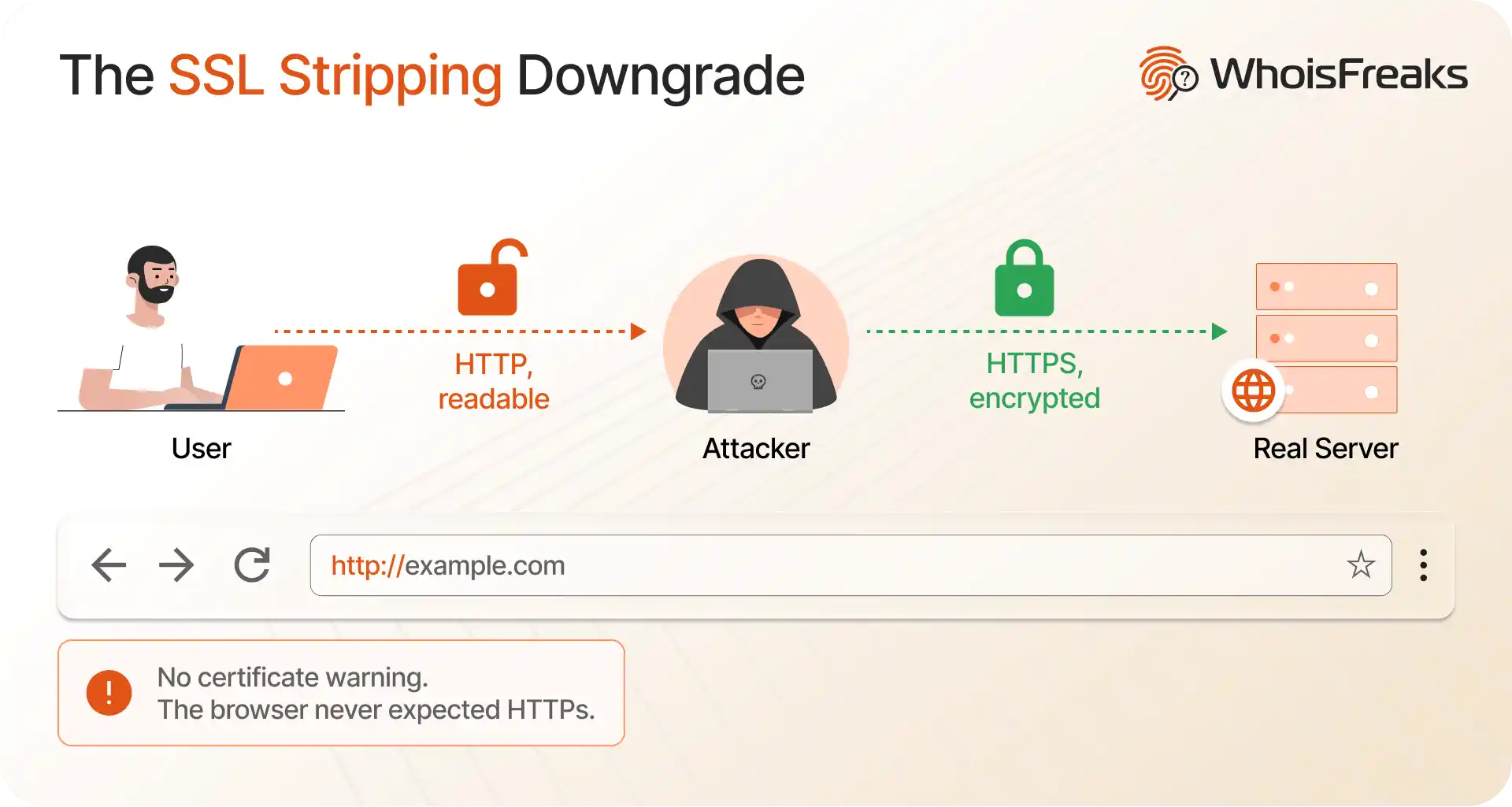
Step 1. The user makes an insecure first request. Typing example.com into a browser address bar produces a request to http://example.com, not https://. Clicking an old link with an http:// prefix does the same thing. That first request travels in clear text.
Step 2. The attacker intercepts it. The attacker needs a position between the user and the network, which in practice means a hostile or compromised Wi-Fi network, a rogue access point, ARP spoofing on a local network, or a compromised router.
Step 3. The attacker connects to the real server over HTTPS. The server sees a normal, correctly encrypted connection from what appears to be a legitimate client. Nothing on the server side looks wrong.
Step 4. The attacker serves the user plain HTTP. The attacker relays content to the victim over unencrypted HTTP, rewriting any https:// links and redirects to http:// as it passes them along. The user sees a working page.
Step 5. Everything the user types is readable. Login credentials, session cookies, payment details, and form submissions all cross the attacker's position in clear text.
The reason this works is that the browser never had a secure connection to lose. A certificate warning appears when a browser expects HTTPS and gets something wrong. Here the browser expected HTTP and got HTTP. There is nothing to warn about.
SSL stripping is one technique within the broader man-in-the-middle category, and separating it from its siblings matters because the defences differ. For the full range of MitM techniques beyond the certificate-related ones, see man-in-the-middle attacks explained.
A man-in-the-middle attacker sits between two parties and can read, alter, or inject data. Against an HTTPS site, there are three ways to get there, and only one of them is stripping.
| Technique | What the attacker does | What the user sees | Defence |
|---|---|---|---|
| SSL stripping | Prevents the encrypted connection from being established at all | A normal HTTP page, no warning | HSTS |
| Forged or mis-issued certificate | Presents a certificate the client wrongly accepts | Nothing, if validation is lax | Certificate validation, CT log monitoring |
| Compromised or coerced CA | Obtains a technically valid certificate for a domain they do not own | Nothing, the certificate is genuine | Certificate transparency, pinning |
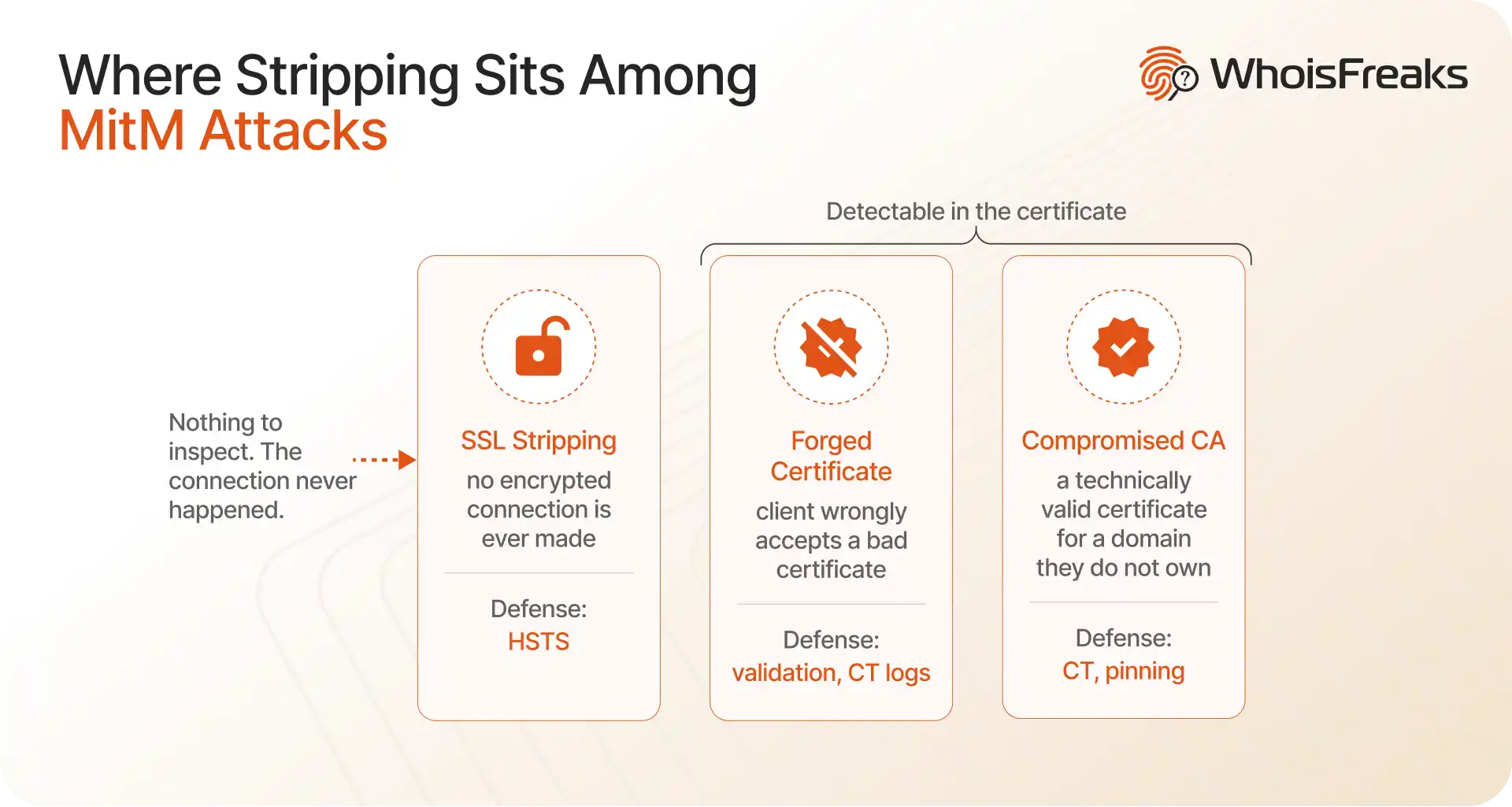
The second and third rows are certificate problems and are detectable by inspecting certificates. The first is not, which is why stripping deserves separate treatment. A forged certificate can occur when:
HTTP Strict Transport Security is the standardised answer to stripping, and it exists because of this specific attack. Strict Transport Security was proposed in 2009 in response to a public demonstration of how a hostile network could downgrade visitor connections, and was finalised as RFC 6797 by the IETF in November 2012, per the US government's HTTPS-Only Standard.
HSTS works by removing the insecure first request. A server sends a response header instructing the browser that this domain must only ever be contacted over HTTPS:
Strict-Transport-Security: max-age=63072000; includeSubDomains; preloadOnce a browser has seen that header, it upgrades http:// requests to https:// internally before any packet leaves the machine. There is no clear-text request for an attacker to intercept.
max-age sets how long, in seconds, the browser remembers the policy. The value above is two years. OWASP recommends a long duration rather than a short one.includeSubDomains extends the policy across every subdomain. Without it, a subdomain left on HTTP remains a stripping target even when the main domain is protected.preload signals consent to be added to the HSTS preload list maintained by Chrome and used by Firefox and Safari. This closes the remaining gap, described below.HSTS protects a browser that has already seen the header. It cannot protect the very first visit from a device that has never connected before, because the policy has not been delivered yet. That first request is the one window a stripping attacker still has.
The preload list closes it. Browsers ship with the list built in, so a preloaded domain is protected before the first connection. Note that preloading is difficult to reverse and applies to all subdomains, so it is a decision to make deliberately rather than by copying a header.
One configuration error undoes all of it. Sending the HSTS header over plain HTTP rather than HTTPS leaves it strippable, since an attacker can remove the header from an unencrypted response before the browser ever reads it. HSTS must be served over HTTPS to mean anything.
Stripping itself is a network-level attack and certificate inspection will not detect it in progress. What certificate data does tell you is whether a domain is configured in a way that leaves stripping possible, and whether a certificate has been issued to something impersonating you.
Four checks are worth running against any domain you are assessing: