









Which app do you need
Run both when you own both feed products. Keep the feeds in Splunk Enterprise, where storage and search are cheap, and send only the matches to SOAR.
| Splunk Enterprise & Cloud | Splunk SOAR | |
|---|---|---|
| What triggers it | A search, a dashboard, or a scheduled feed input | An analyst clicking Action, or a playbook |
| What it takes in | Any domain, IP, ASN or keyword, typed or pulled from your logs | Artifacts on a case (domain, IP and so on) |
| Volume | Ad hoc lookups plus millions of feed rows a day | One case at a time; feed polling is optional and capped |
| What you get back | Events in Splunk, exact API JSON with searchable fields | action_result.data, exact API JSON, plus notes, tags, severity |
| What it needs | API key; the NRD and threat-feed products for the inputs | WhoisFreaks API key |
| Best for | Hunting, correlation with your logs, dashboards, feed storage | Automated triage, enrichment inside a case, response playbooks |
At a glance
| Property | Details |
|---|---|
| Apps | WhoisFreaks for Splunk (Enterprise and Cloud); WhoisFreaks App for Splunk SOAR |
| Version | 1.0.0 (both) |
| Splunk support | Splunk Enterprise 9.x and 10.x, Splunk Cloud; Splunk SOAR 6.4.0 and later |
| Python runtimes | 3.9 and 3.13 |
| Accepted inputs | Domain, IPv4, IPv6, ASN, email, owner, company, keyword (reverse WHOIS), brand label (typosquatting) |
| Output format | Exact API JSON, nothing flattened or dropped, nulls kept |
| Feeds | Newly registered domains (gTLD and ccTLD, with or without WHOIS) and the phishing, malware and spam threat feeds |
| Timeouts | 30s per request on Enterprise (configurable), 90s default on SOAR, reverse WHOIS up to 120s |
| License | Apache-2.0 |
| Category | Security, Fraud and Compliance |
| Support | [email protected] |
What you can do
Type a command in the search bar and get one event back whose _raw is the full API record. In SOAR the same lookups are actions you drop into a playbook or run by hand from a case. Bulk versions of WHOIS, DNS, domain availability and IP intelligence take up to 100 inputs in a single call.
21 search commands
Enrich any domain, IP, ASN or brand term straight from the Splunk search bar.
22 SOAR actions
The same lookups as actions playbooks and analysts run from a case.
Two daily feeds
Newly registered domains and the phishing, malware and spam threat feeds, ingested on their own.
Five dashboards
Overview, Newly Registered Domains, Threat Feeds, Domain Profile and Configuration.
Domain Profile is the dashboard analysts live in: type a domain and it shows live WHOIS, reputation, DNS, the SSL chain, subdomains and WHOIS history as panels. Each panel spends credits, so it's on manual submit by design.
What you need before you start
Three things, and the last one is what catches people out.
One key works for both apps. The free tier covers install, configuration and testing.
Splunk Enterprise 9.x or 10.x, Splunk Cloud, or Splunk SOAR 6.4.0 and later.
The apps call WhoisFreaks directly, through a proxy if you set one.
Account
Free API credits cover the lookup commands and actions, not the feed inputs. The feeds need the NRD or threat-feed product on your key.
The Splunk Enterprise and Cloud app
The hunting and feed-storage side: 21 search commands, two daily feed inputs and five dashboards. Install it, add your key, verify in 30 seconds, then turn on the feeds.
In Splunk Web open Apps, then Find More Apps, and search for WhoisFreaks. Open WhoisFreaks for Splunk and click Install, sign in with your splunk.com account, accept the license, and restart if Splunk asks.
For an air-gapped search head, download the package on a connected machine, then use Apps › Manage Apps › Install app from file and upload whoisfreaks-1.0.0.tar.gz.
Open WhoisFreaks › Configuration, paste the key from your WhoisFreaks dashboard, set a timeout and proxy if you need them, and save. The key goes into Splunk's encrypted credential store, never a conf file in clear text.
Verify in 30 seconds
Run this in Search and Reporting. One event with your plan name and credit counters means the key works; then enrich a domain and expand the event to see the full WHOIS record as JSON.
| whoisfreaksstatus include_feeds=false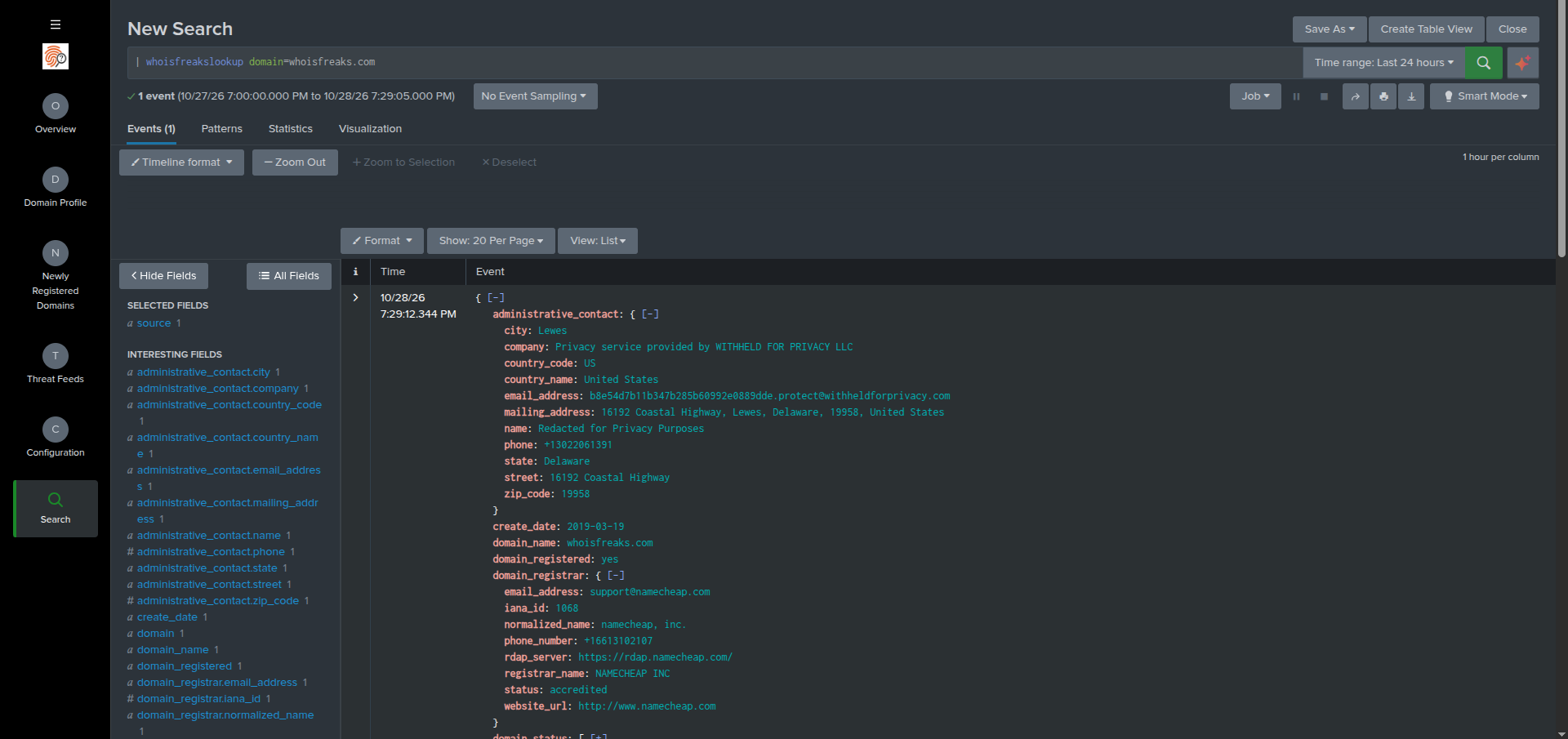
Turn on the feeds (needs the NRD or threat-feed product)
Go to Settings › Data inputs. Create a whoisfreaks index first, or point the whoisfreaks_index macro at an index you already have. Then add the inputs:
| Input | First-run values |
|---|---|
| WhoisFreaks Threat Feed | name threat_feeds, feed all, replace_mode after, page_size 1000, max_pages 0, retention_days 2, interval 600, index whoisfreaks |
| WhoisFreaks Newly Registered Domains | name nrd, nrd_type all, include_whois checked, retention_days 30, interval 600, index whoisfreaks |
For a quick lab test, set max_pages=5: each run ingests 5,000 rows and reports status=partial, and the next run continues where it stopped. For production leave max_pages=0. Watch progress with:
index=whoisfreaks sourcetype=whoisfreaks:ingest earliest=-24h
| table _time input feed nrd_type status reason date events duration_sec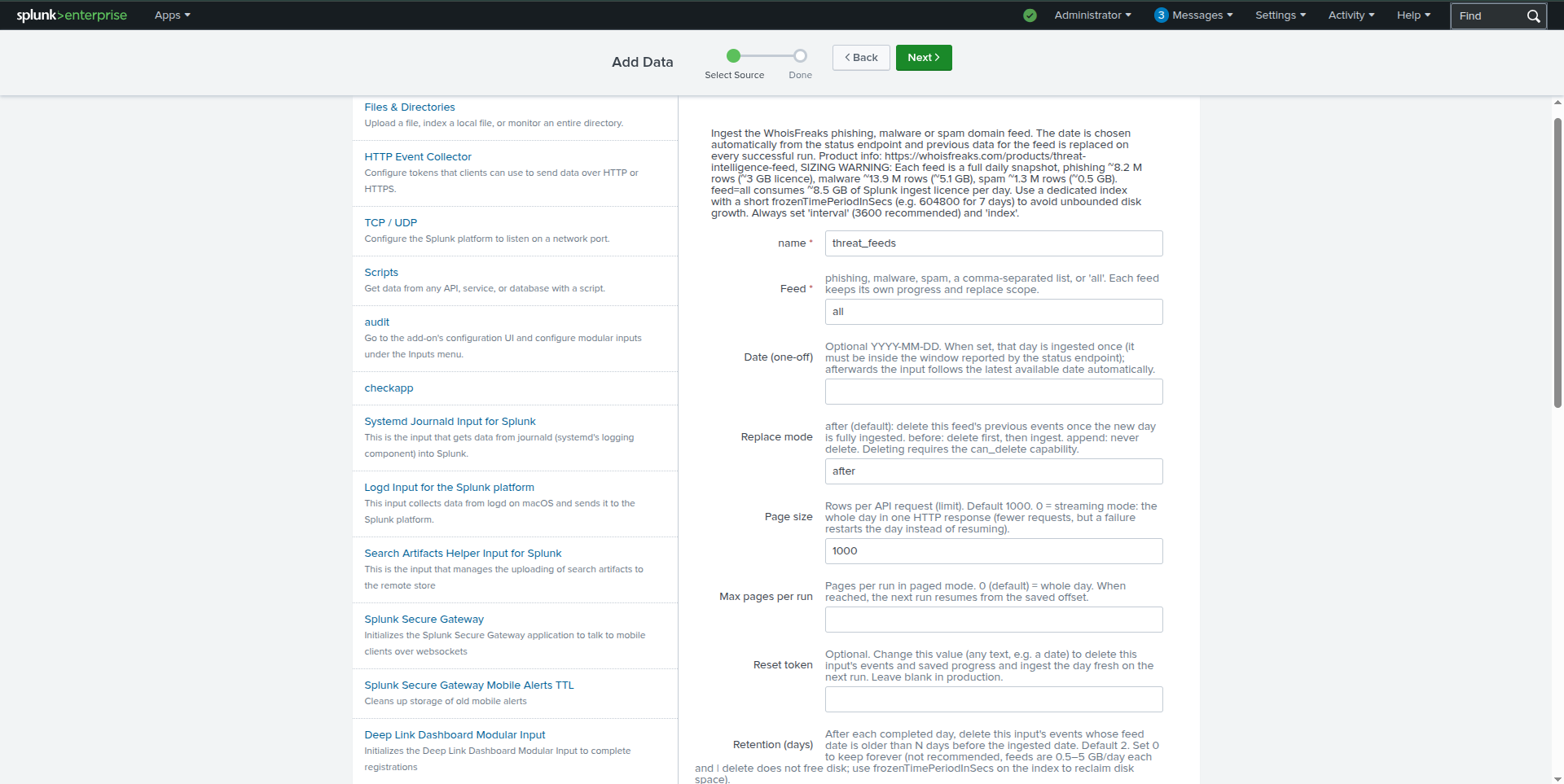
Five dashboards ship with the Enterprise app
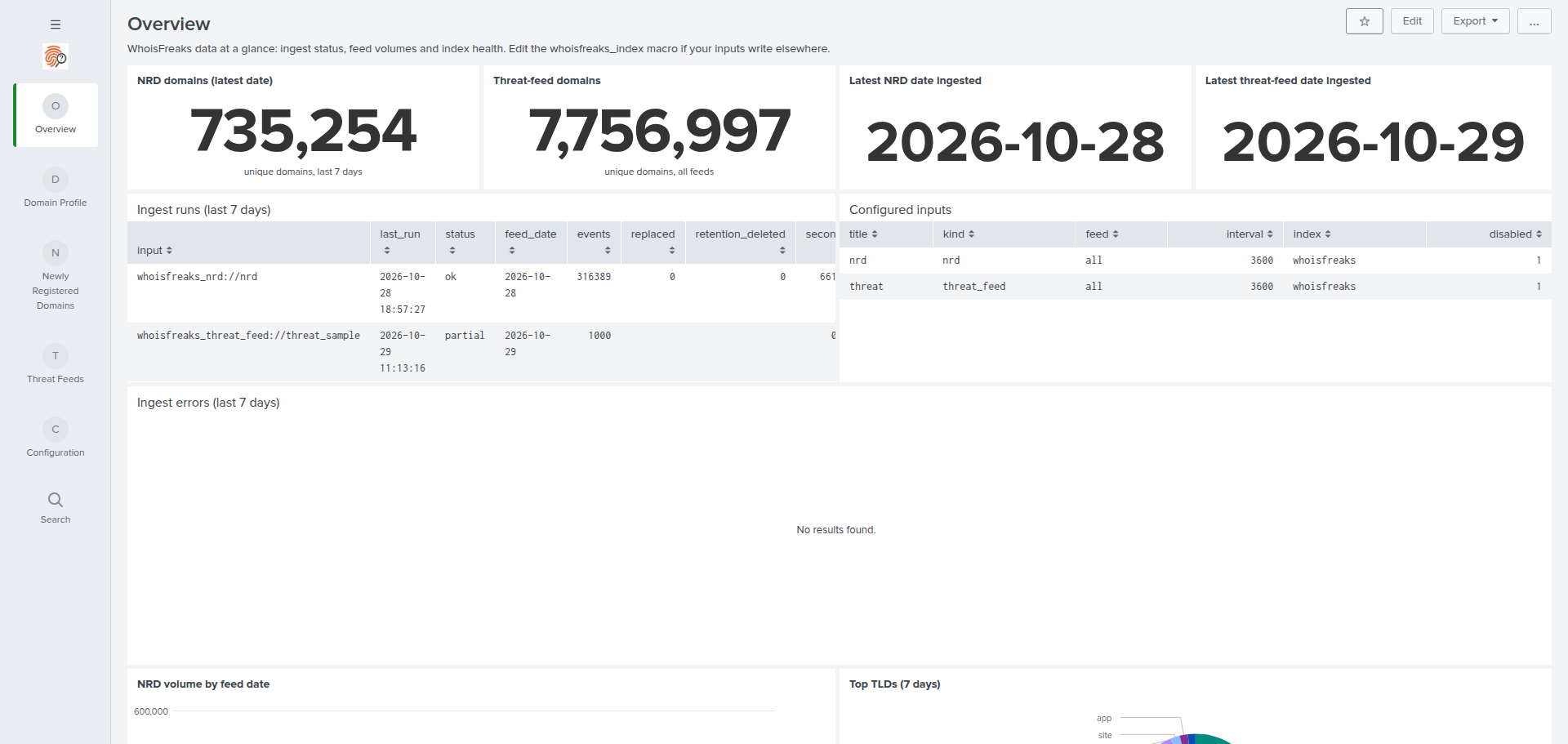
Overview is your daily health check, Domain Profile is where analysts pivot on one domain, and the feed dashboards chart volume and confidence. Click any screenshot to enlarge it.
Overview
WhoisFreaks data at a glance: ingest status, feed volumes, latest dates and index health.
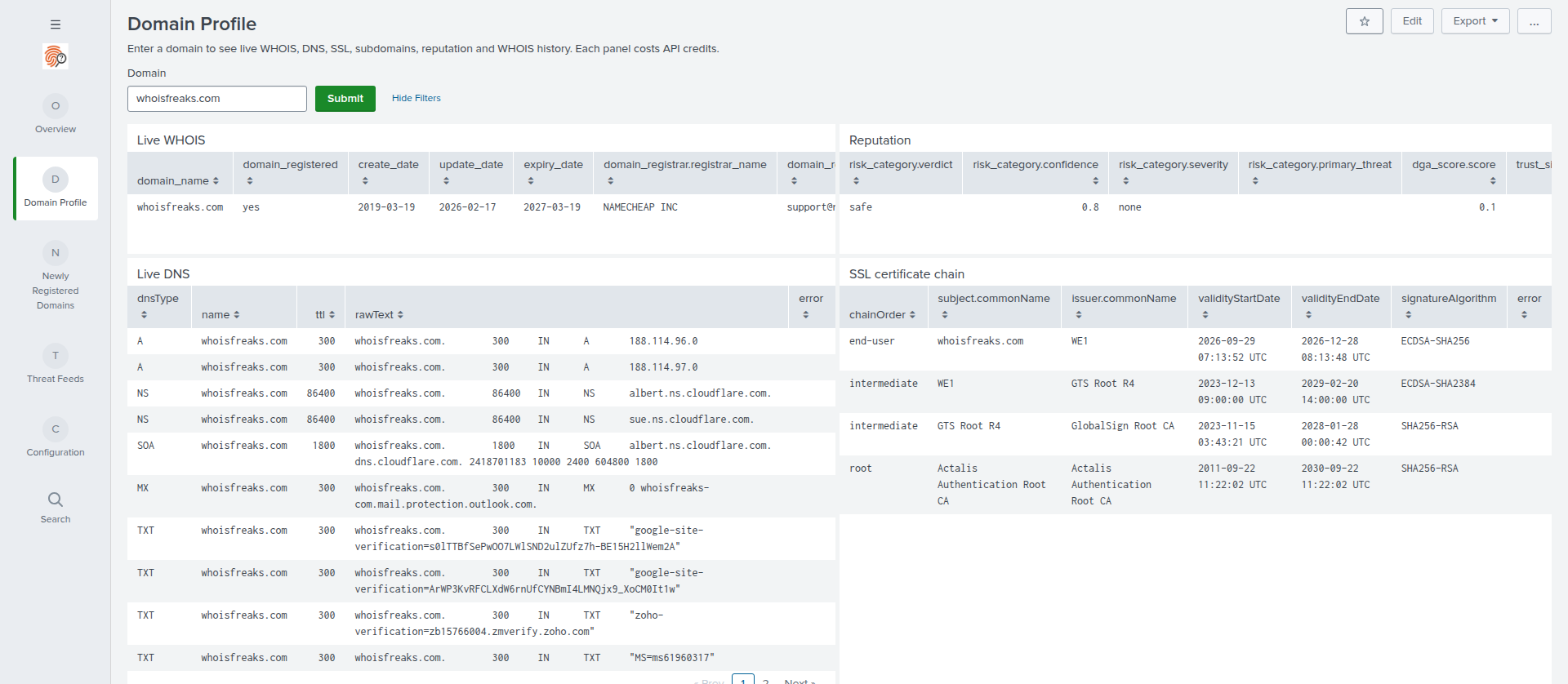
Domain Profile
Type a domain for live WHOIS, reputation, DNS, the SSL chain, subdomains and WHOIS history.
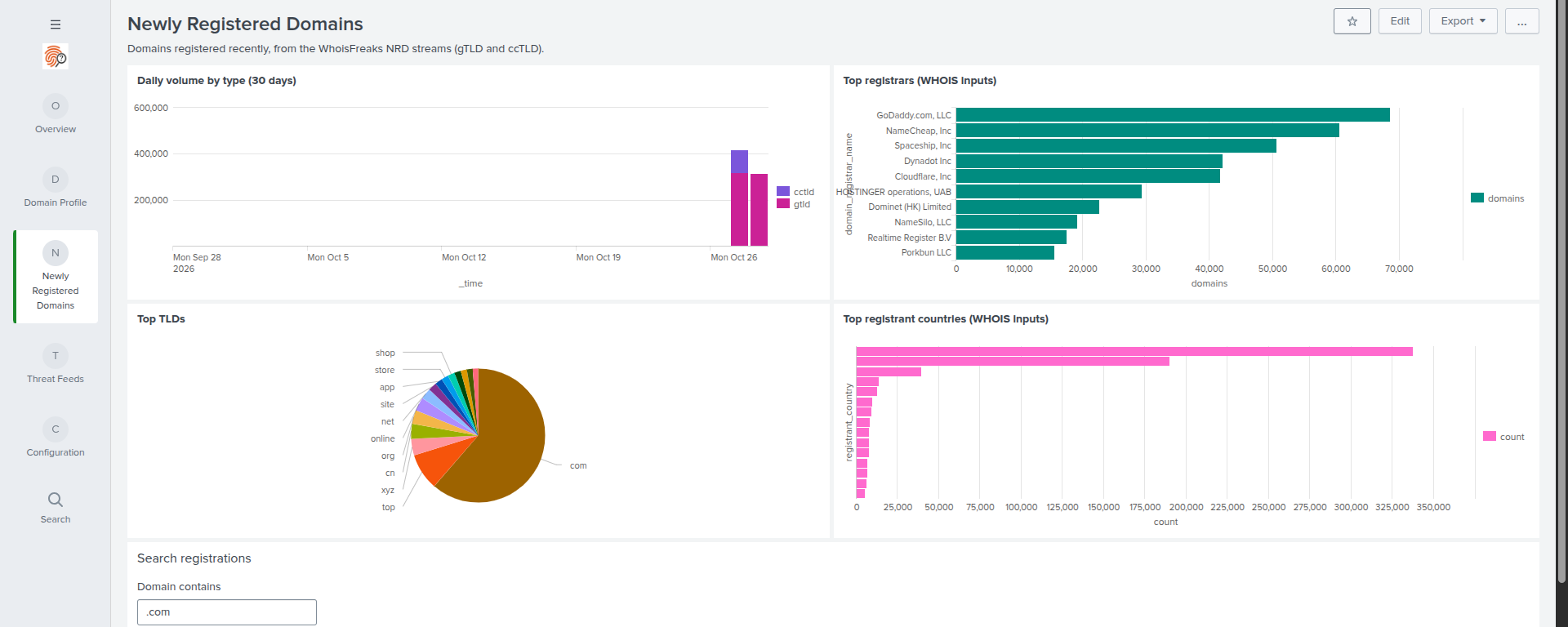
Newly Registered Domains
Daily volume by type, top registrars, top TLDs and registrant countries from the NRD streams.
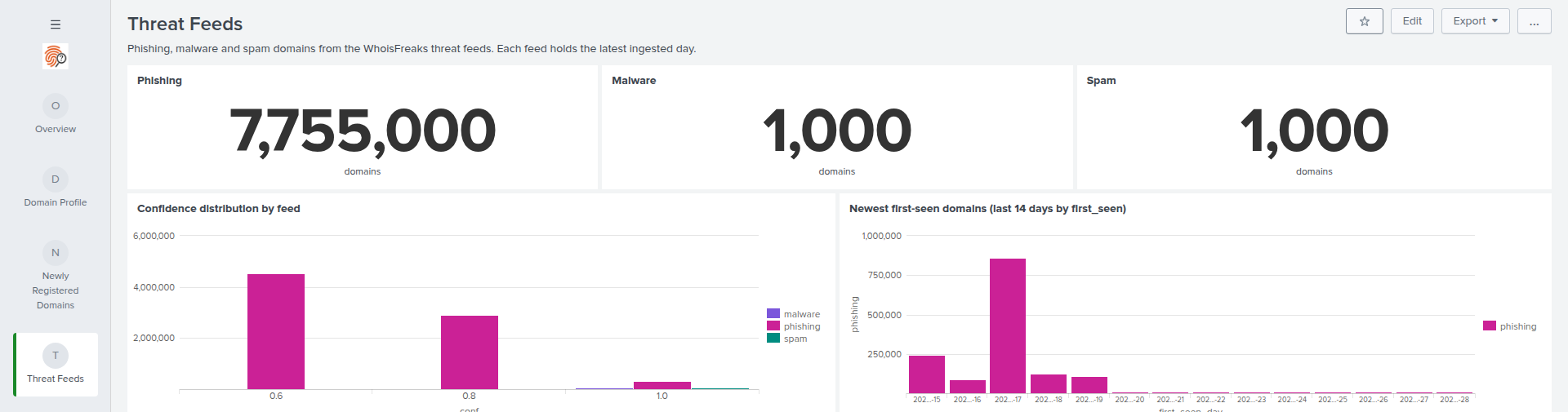
Threat Feeds
Phishing, malware and spam domains with confidence distribution and newest first-seen domains.
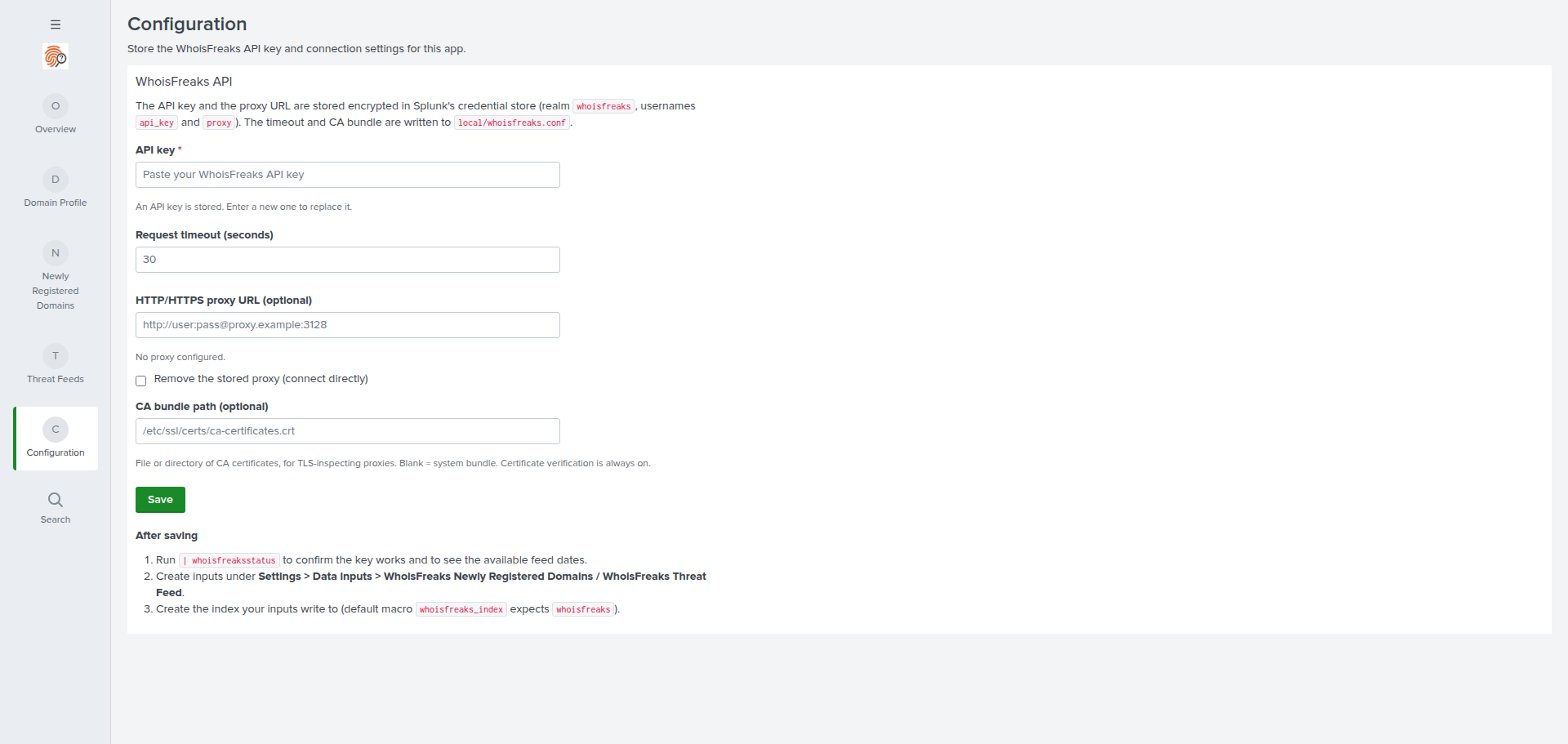
Configuration
Store the API key, timeout and proxy for the app, encrypted in Splunk's credential store.
The Splunk SOAR app
The response side: 22 actions for playbooks and analysts. Install the app, create the asset, run an action by hand, and optionally poll the feeds.
In Splunk SOAR open Apps, then the New Apps tab, search for WhoisFreaks and install WhoisFreaks App for Splunk SOAR. The app moves to the Installed tab with 22 actions, plus test connectivity and on poll.
Offline SOAR installs the same way: download WhoisFreaks.tgz on a connected machine and upload it under Apps › Install App.
Open Apps › WhoisFreaks › Configure New Asset, name it, paste the API key in Asset Settings, and leave the rest default. Save, then run Test Connectivity. A pass shows your plan name.
Test connectivity isn't free. It checks the key against the usage endpoint and then runs one live WHOIS lookup, which costs 1 credit. That second call is deliberate: it catches an IP-allowlist block the usage check alone would miss.
Run an action by hand
Open or create a case, press Action, pick WhoisFreaks, then lookup domain, choose your asset, enter whoisfreaks.com, and Launch. In the Activity panel, open the finished action and read the full WHOIS record under data, 0.
Optional: let SOAR poll the feeds
On the asset, open Ingest Settings, set a label, enable polling and choose an interval of about 60 minutes. In Asset Settings, turn on poll_enabled, set poll_source to threat_feed, and keep poll_threat_feed_min_confidence at 0.9. Every row at or above that confidence becomes a container with a domain artifact and a threat-<feed> tag.
The search commands and SOAR actions
Parameter names match on both platforms unless a row says otherwise. Lists accept commas or newlines, and booleans accept true/false, 1/0 or yes/no.
| Command (Enterprise) | Action (SOAR) | Input | Returns |
|---|---|---|---|
| whoisfreakslookup | lookup domain | domain | Live WHOIS: registrar, create and expiry dates, contacts, name servers, status, raw registry text |
| whoisfreakshistoricalwhois | historical whois | domain | Every WHOIS snapshot, each a full record with a query time |
| whoisfreaksreverse | reverse whois | query, search_type, mode, exact, page | Domains tied to a registrant value (email, owner, company, keyword) |
| whoisfreaksbulk | bulk whois | domains (up to 100) | One full WHOIS record per domain |
On Enterprise, whoisfreaksstatus returns account usage and, with include_feeds=true, a second event with each stream's status. In SOAR these are two actions, account usage and feed status. That one split is why Enterprise counts 21 commands and SOAR counts 22 actions.
To get one row per record in Splunk (DNS answers, certificates, subdomains and the like), expand the array:
| whoisfreaksdns domain_or_ip=whoisfreaks.com record_type="A,MX"
| spath path=dnsRecords{} output=rec | mvexpand rec | spath input=rec
| table dnsType name ttl address exchange priority
The feeds: newly registered domains and threat intelligence
The feed inputs are built for volume, not minute-by-minute polling. Feeds refresh once a day, so an hourly schedule is plenty, and a day already ingested is a no-op that costs nothing.
- infoThe date comes from the status endpoint. Set a date and the input ingests that one day (after checking it falls inside the feed's published window), then follows the latest date on its own. Leave it empty for "always latest".
- infoThreat feeds replace by default. replace_mode=after ingests the new day, then deletes earlier events. before deletes first; append never deletes. Pick append with retention_days=0 for full history.
- infoProgress is checkpointed every 10,000 rows. Kill a run mid-day and the next one resumes from the saved offset. Only one process per feed runs at a time, and an offset past the end returns a header row, which is the stop signal.
- infoRow timestamps are spread across the feed day. Millions of rows don't share one _time. Search feed data with earliest=-2d or by the date field, not "last 15 minutes".
Feed events land under four sourcetypes: whoisfreaks:nrd (domain list), whoisfreaks:nrd_whois (one event per domain with every WHOIS column), whoisfreaks:threat_feed (one event per feed row), and whoisfreaks:ingest (one summary per run).
A worked example: a phishing-feed domain seen in your network
Splunk Enterprise is the detection layer: it stores everything, feeds included, and searches over it. SOAR is the response layer, where every container costs analyst time. So the feed stays in Splunk, and only a hit becomes a case.
Threat feed in index=whoisfreaks, joined against your DNS or proxy logs. A scheduled alert keeps the fields SOAR needs and its action is Send to SOAR.
Each hit creates a container. The triage playbook runs lookup domain, domain reputation, live dns and ssl lookup, then writes a note, tags the container and raises severity when the verdict is malicious.
The analyst opens a case that already reads "link domain registered 2 days ago, verdict malicious" and decides from there. The same pattern handles suspicious email: match the sender domain and link hosts against the feeds you already keep in Splunk (no API credits spent), and send only the matches to SOAR with the email context attached.
What the results contain
Domain enrichment (lookup domain and domain reputation)
| Field | Example | What it tells you |
|---|---|---|
| create_date, expiry_date | 2019-03-19, 2027-03-19 | Age is the strongest phishing signal |
| domain_registrar.registrar_name | NAMECHEAP INC | Plus email_address for abuse reports |
| registrant_contact.* | Redacted for Privacy | Privacy services are normal, not suspicious on their own |
| risk_category.verdict | malicious | With confidence 0 to 1 and severity |
| risk_category.primary_threat | phishing_extrapolated | The _extrapolated suffix means inferred from a shared pivot |
| dga_score.is_dga | false | Is the name algorithmically generated |
| email_deliverability.grade | F | SPF, DKIM and DMARC posture |
| intelligence.stix_pattern | [domain-name:value = '...'] | Ready for TIP export |
IP enrichment (ip whois, ip geolocation, ip security)
| Field | What it tells you |
|---|---|
| asn.asn, asn.name | Network owner |
| country, city, latitude, longitude | Location of the network, not a verified physical address |
| threat_score | 0 to 100 |
| is_tor, is_vpn, is_proxy, cloud_provider | Anonymisation and hosting. A false means "not detected", not "verified clean" |
| rir_whois.* | Registry objects including abuse contacts |
Feed rows carry domain, threat_type, confidence, first_seen, last_seen, is_seed versus is_extrapolated, matched_pivots (why it's on the feed), feed and date.
What it costs
Every lookup command or action is one API call, charged by your plan's per-endpoint credit table, which you can see in your WhoisFreaks dashboard. The feeds are licensed products and aren't billed per row.
- paymentsEnriching the whole feed. Don't run domain reputation on every feed row. The feed already carries confidence and matched_pivots. Enrich only the rows that match your own logs.
- paymentsDashboards on auto-refresh. Domain Profile panels call the API on every refresh, so keep them on manual submit.
- paymentsOne call per domain when a bulk call exists. Bulk WHOIS, DNS, IP geolocation, IP security and domain availability each take up to 100 inputs for the cost of one call.
Things that surprise people when reading results
- infoFeed rows are not "the last 15 minutes". Their _time is the feed date, spread across that day, so a search needs earliest=-2d or the date field.
- infoExtrapolated threats are common. Many feed entries are inferred from a pivot, a shared registrant or name server, rather than directly observed, and the confidence reflects that.
- inforecord_found=false is not an error. The API answered and has no data, for example an unregistered domain or a reverse search with no matches. The action still succeeds.
- infoNulls are shown as null. trust_signals.indicators.registrar: null on an unregistered domain is the API's answer, not a missing field.
- infoVery large numbers round inside SOAR. SOAR stores about 16 significant digits, so IPv6 route sizes above 2^53 lose precision in the last digits. Splunk Enterprise keeps them exact.
- infoOne event per call in Splunk. A DNS answer with 16 records is one event with multivalue fields. Use spath and mvexpand for one row per record.
Troubleshooting
| Symptom | Likely cause | Fix |
|---|---|---|
| WhoisFreaks API key is not configured | Key not saved | Configuration, Save on Enterprise, or asset settings on SOAR |
| AuthError 401 or 403 | Wrong, rotated, or IP-allowlisted key | Paste the current key; allowlist your NAT or proxy address if the key restricts egress IPs |
| RateLimitError 429 | Plan rate limit | Lower the alert frequency and use bulk commands |
| Feed input: no new events | Input disabled, no interval, or the day is already ingested | Enable it, set interval 600, read sourcetype=whoisfreaks:ingest (reason=up_to_date is normal) |
| Feed input: status=partial | max_pages cap reached | Normal; the next run resumes. Set max_pages=0 for whole days |
| Send to SOAR: no container | Automation user is read-only, or the server name is wrong | Give the user Automation Engineer; check index=_internal sourcetype=phantom* |
Diagnostics that never cost credits: index=_internal source=*splunkd.log* whoisfreaks_ for the inputs, index=whoisfreaks sourcetype=whoisfreaks:ingest for run summaries, and SOAR › Administration › System Health for app logs.
Security and network
The API key is encrypted on both platforms and redacted from logs and error messages. Outbound HTTPS goes to api.whoisfreaks.com for lookups and files.whoisfreaks.com for feeds and status, and proxies are supported.
Only the value you query leaves Splunk: a domain, an IP, an ASN or a search term. No log content is sent. The SOAR app goes further and never sends private, loopback, link-local, CGNAT, multicast or documentation IP addresses; those return record_found=false with a skipped status. The SOAR app is FIPS compliant.
If your WhoisFreaks key restricts egress IPs and your Splunk or SOAR host reaches the internet through a NAT gateway or proxy, allowlist that egress address in the dashboard under Account › API Key › IP Restrictions. A 401 or 403 right after a correct key is almost always an allowlist block.
Integration FAQs
Do I need both Splunk apps?
Which plan do I need?
Is the output exactly what the API returns?
record_found and status_message, and the two bulk IP endpoints, which return a bare array, are wrapped as results.Can the feeds go to Splunk and only matches to SOAR?
How far back do the feeds go?
available_from and last_update per feed. Set date on an input to ingest one past day, then it follows the latest date automatically.How do I get one row per DNS record, certificate or subdomain in Splunk?
| spath path=<list>{} output=x | mvexpand x | spath input=x.Can I see whether a domain is newly registered without spending lookup credits?
What happens if a feed input is killed mid-day?
Does the SOAR app support playbook data paths for nested fields?
block:action_result.data.*.a.b, and .* for lists.How do I check which version I'm on?
Enrich Domains, IPs and ASNs in Splunk
Create a WhoisFreaks account, paste the key into Splunk or SOAR, and run the verify search or test connectivity. The free tier covers install, configuration and testing.