Written ByUsama Shabbir, WhoisFreaks Team Published: November 27, 2026, Last Updated: November 27, 2026
To tell if a website is legit, check the domain behind it as well as the page. A scam site can copy a real brand's logo, layout and wording. It can't change when its domain was registered, what its WHOIS history shows, or whether threat data has already flagged it.
Phishing domains are usually brand new when they're caught. Across 55,541 phishing domains that entered the WhoisFreaks phishing feed from third-party threat sources between 31 July and 28 October 2026, the median domain was 10 days old when it was added, and 60.1% were less than 30 days old.
Source: WhoisFreaks phishing feed, domains added from third-party threat sources between 31 July and 28 October 2026, excluding domains on shared hosting platforms. Age is the gap between the WHOIS creation date in effect when each domain was added and the date it was added.
Each check below uses a free WhoisFreaks tool. Every example is a real phishing domain flagged in October 2026, written with [.] so it can't be clicked.
TL;DR
Start with the page. A lookalike address, a link you didn't ask for or pressure to pay now is reason enough to stop.
Then check the domain: its age, WHOIS record, history, DNS records, certificate and reputation.
Six in ten phishing domains in WhoisFreaks data were under 30 days old when added, but age alone proves nothing either way.
One red flag means keep checking. Several together mean close the tab.
Quick signs of a fake website on the page
Before you look anything up, check what's in front of you.
The address. A brand name inside a longer domain is not the brand's own site. netflix-billing-update[.]com is not netflix.com, and security-appleid[.]com is not apple.com. All three examples below pair a brand name with a word like billing, security or card.
How you got there. A link in a text message, a DM, an ad or an unexpected email deserves more suspicion than an address you typed yourself.
How it wants to be paid. Bank transfers, crypto and gift cards are hard to get back. A shop that accepts nothing else is a warning sign.
The price and the pressure. Prices far below every other seller, countdown timers and "only 2 left" messages push you to pay before you check.
The padlock. It means the connection is encrypted. It doesn't tell you who runs the site.
A well-made fake can pass all five. The domain record is much harder to fake.
Six domain checks, each with a free tool
Copy the domain from the address bar: the part after https:// and before the next slash. For hxxps://netflix-billing-update[.]com/account/login (https is written as hxxps here so it can't be clicked), that's netflix-billing-update[.]com. Each tool is free for single lookups, and the results shown here were captured on 27 November 2026.
1. How old is the domain?
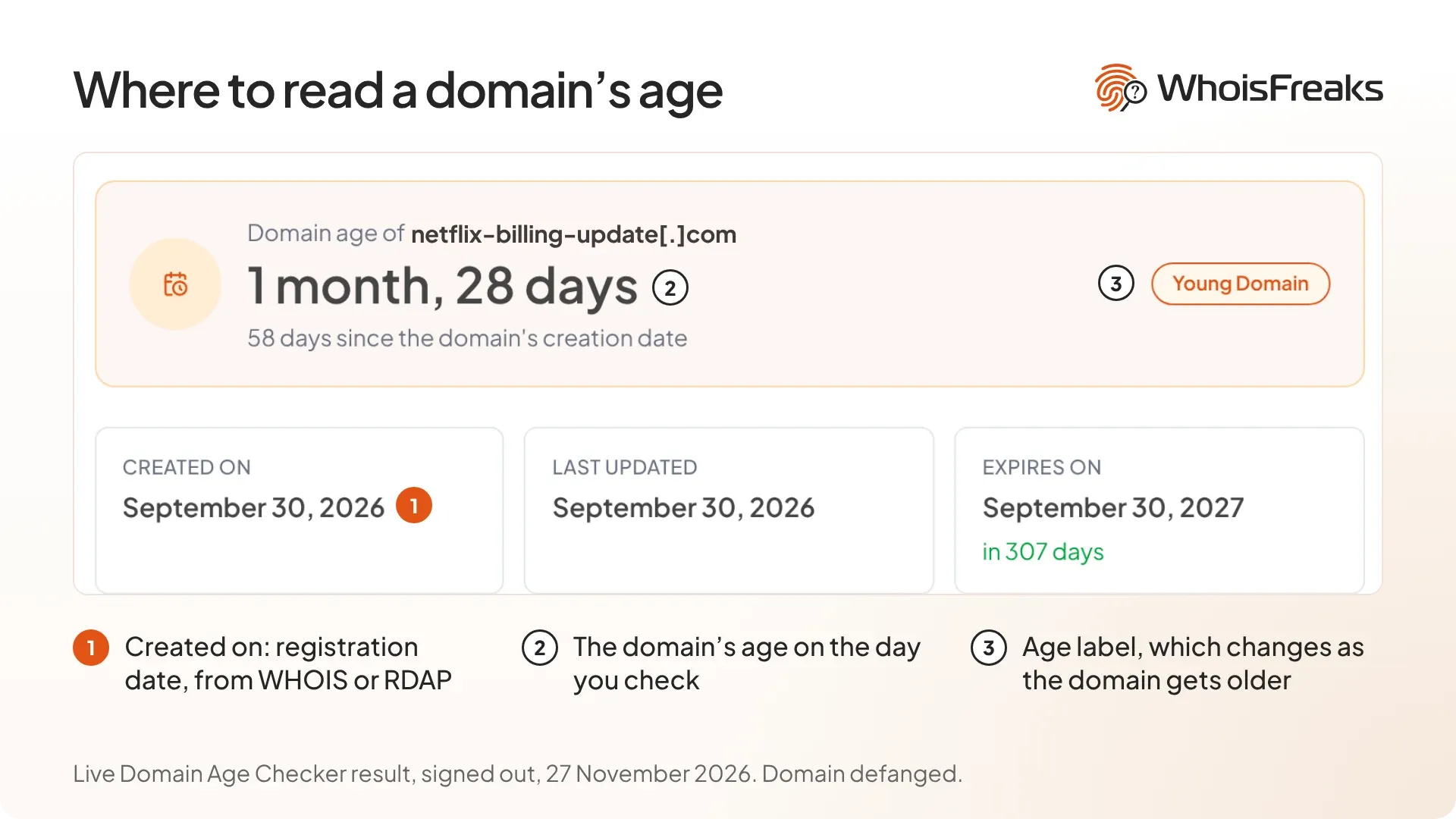
Paste the domain into the Domain Age Checker. It reads the creation date from the domain's WHOIS or RDAP record and shows the age in years, months and days. Domains under 30 days old are labeled Newly Registered, and domains 10 years or older are labeled Aged Domain.
All three examples were caught within days of registration. netflix-billing-update[.]com was registered on 30 September 2026 and flagged as phishing on 3 October. security-appleid[.]com was flagged two days after registration, and securepaypalcard[.]com three days after.
Two cases where age misleads:
New isn't guilty. New businesses register domains every day. A young domain is a reason to run the other five checks, not a verdict.
Platform addresses. Some sites live on a hosting platform's address, like yourshop.pages.dev or yourapp.vercel.app. 30.7% of the phishing domains in that period were hosted on shared platforms such as pages.dev and vercel.app, where domain age reflects the platform, not the scammer. For an address like that, go straight to step 6.
The age shows as unknown for some country-code domains, because their registries don't publish a creation date.
2. What does the WHOIS record say?
Run the domain through WHOIS Lookup. Dates show without an account; sign in free to see the registrar and contact details.
Field
What to look for
Creation date
Does it fit the site's story? A shop that says "trusted since 2012" on a domain created last month has one of those facts wrong.
Expiry date
All three examples were registered for exactly one year. Many real sites also renew yearly, so this only counts alongside other flags.
Registrant
Often hidden. netflix-billing-update[.]com shows "REDACTED FOR PRIVACY," and security-appleid[.]com lists a privacy service. Real sites hide these details too, so a hidden owner isn't a red flag on its own.
Write down the registrar. You'll compare it with older records in the next step.
3. Has the domain changed hands?
The age check has a blind spot. When a domain expires and someone registers it again, the creation date starts over. The WHOIS History Lookup shows the earlier records, going back to 1986.
netflix-billing-update[.]com shows why this matters. On 27 November 2026, the Domain Age Checker showed it as 58 days old, which is true of the current registration. Its history shows the same name registered four separate times:
Registration
Created
Registrar
First
5 November 2019
Registrar.eu
Second
26 January 2021
Namecheap
Third
30 December 2022
Wild West Domains
Current
30 September 2026
Registrar.eu
Every registration hid the owner behind a privacy service, so the records can't tell you whether the same person held it each time. They do show a name that has been dropped and picked up again and again, which is not what a business with a steady history looks like.
History works in the other direction too. An old domain isn't automatically safe: 8.8% of the phishing domains in the WhoisFreaks sample were a year or older when they were added. For an older domain, look for a recent change of registrar or owner in its history.
4. Can it receive email?
DNS Lookup returns a domain's A, AAAA, MX, NS, SPF, SOA, TXT and CNAME records. Two of them matter most here:
MX records say where the domain's email goes. If a site asks you to write to an address at its own domain and has no MX record, nobody can receive that email.
SPF records list the servers allowed to send email for the domain. A business that emails its customers normally publishes one.
netflix-billing-update[.]com has a single A record pointing to a web server, plus nameservers at its registrar. It has no MX record and no SPF record. So a "billing" site has no way to receive email at its own address.
The Apple and PayPal examples return no DNS data at all. Both domains are still registered, but they no longer point anywhere.
Records aren't proof in the other direction. Anyone who controls a domain can add MX and SPF records, so finding them only tells you the basics are in place.
5. What does the certificate show?
The padlock tells you the connection is encrypted and nothing about who is on the other end. SSL Lookup shows what's behind it. Compare three things:
Issue date against the site's story. A site that claims years of history, on a certificate and a domain that both date from last month, doesn't add up.
The names it covers. A certificate lists every domain it protects. Unrelated brand names on one certificate deserve a second look.
Whether it's valid. An expired, self-signed or mismatched certificate is a reason to leave, especially on a page that asks for a password or a card number.
None of the three examples had a certificate when we checked them on 27 November. Never type a password or card details into a page without HTTPS.
6. Is it already on a threat list?
Domain Reputation Check returns a safe, suspicious or malicious verdict and a trust score from 0 to 100, with the reasons behind both, from six checks. All three examples came back malicious. netflix-billing-update[.]com scored 9, and the Apple and PayPal domains each scored 0.
The Phishing Domain Checker shows whether the domain is in WhoisFreaks phishing data and the evidence behind the match. WhoisFreaks starts from phishing domains reported by third-party sources. It then follows shared registration and network details, such as nameservers, mail servers and registrant records, to related domains. That's how a new domain from a known campaign can be flagged before anyone reports it.
A clean result isn't a guarantee. A domain registered yesterday may not be on any list yet, and a site can be unsafe for reasons other than phishing. That's why checks 1 to 5 come first.
How to read the results together
No single check settles it. Sort what you found into the table, then count the flags.
Check
Usually fine
Look closer
Leave
Domain age
Older than the site claims to be
Under 30 days old
Under 30 days old, and the site claims years of history
WHOIS
Dates fit the site's story
Owner hidden
Dates contradict the site
History
Same registration for years
Re-registered recently
Re-registered again and again
DNS
MX and SPF records present
No SPF record
No MX record, but the site asks you to email it
Certificate
Valid, covers this site's name
Issued in the last few days
Missing, expired, self-signed or covering unrelated brands
Reputation
Safe, high trust score
Suspicious
Malicious, or matched to known phishing
One result in the middle column means keep checking. Anything in the right column, or several results in the middle, means close the tab.
What to do if a website looks like a scam
You haven't entered anything. Close the tab. Don't sign in, pay or open any file it downloaded.
You entered a password. Change it on the real site and anywhere else you use it, and turn on two-step sign-in.
You paid or entered card details. Call your bank or card issuer right away, using the number on your card, not one from the site.
Report it. In the US, report the site to the FTC through its ReportFraud site. In the UK, send it to the NCSC's suspicious website reporting service. You can also report it to the brand it impersonates.
Frequently Asked Questions
Explore frequently asked questions to better understand our features, functionality, and usage.
Can a fake website have HTTPS?
Yes. A certificate proves the connection between your browser and the site is encrypted, not that the site is honest, and anyone who controls a domain can get one. Check the domain's age and history instead of relying on the padlock.
What are three signs a website is trustworthy?
A domain that's older than the site's claims, a WHOIS history without repeated re-registrations, and a safe verdict from a domain reputation check. Contact details and clear refund and privacy policies on the page help too, but scam sites copy those.
Can you find out who owns a website?
Sometimes. A WHOIS lookup shows the registrant when the owner has published those details, but many owners hide them behind a privacy service, which is normal for real sites too. Historical WHOIS records can show owner details from before they were hidden.
Is WHOIS data trustworthy?
The dates, registrar and nameservers are reliable because they come from the registry or registrar that manages the domain. Owner details are supplied by whoever registered the domain and are often redacted, so treat them as a claim rather than a fact.
Is there a Google tool to check if a website is safe?
Yes. Google Safe Browsing has a site status check that shows whether Google has flagged a site as unsafe. Like any blocklist, it can miss a domain registered in the last few days, so pair it with a domain age and WHOIS check.