
Guide
What Is Domain Name System (DNS) and Why It Matters

Written By Qasim, WhoisFreaks Team Published: December 11, 2025, Last Updated: July 22, 2026
Guide
Written By Qasim, WhoisFreaks Team Published: December 11, 2025, Last Updated: July 22, 2026
The Domain Name System (DNS), or what is Domain Name System, translates easy-to-remember domain names into IP addresses, making internet browsing straightforward. Without DNS, you’d have to remember complex numerical addresses for each website.
The Domain Name System (DNS) is a distributed database organized in a hierarchical structure, much like the Unix file system. This structure resembles an inverted tree, with the root node at the top and leaf nodes at the bottom. Each node in the tree has a text label identifying it relative to its parent, with the root node represented by a dot (.), similar to the root slash (/) in Unix. The DNS hierarchy begins at the root, which acts as the entry point for queries, and extends to the leaves, which serve as the final destination. Along this path, each node functions as a server: the root node is a root server, intermediate nodes are top-level domain (TLD) servers, and the leaf nodes are authoritative name servers. A domain name, such as whoisfreaks.com, represents a sequence of these text labels from the root to a leaf, though the root is typically omitted for simplicity.
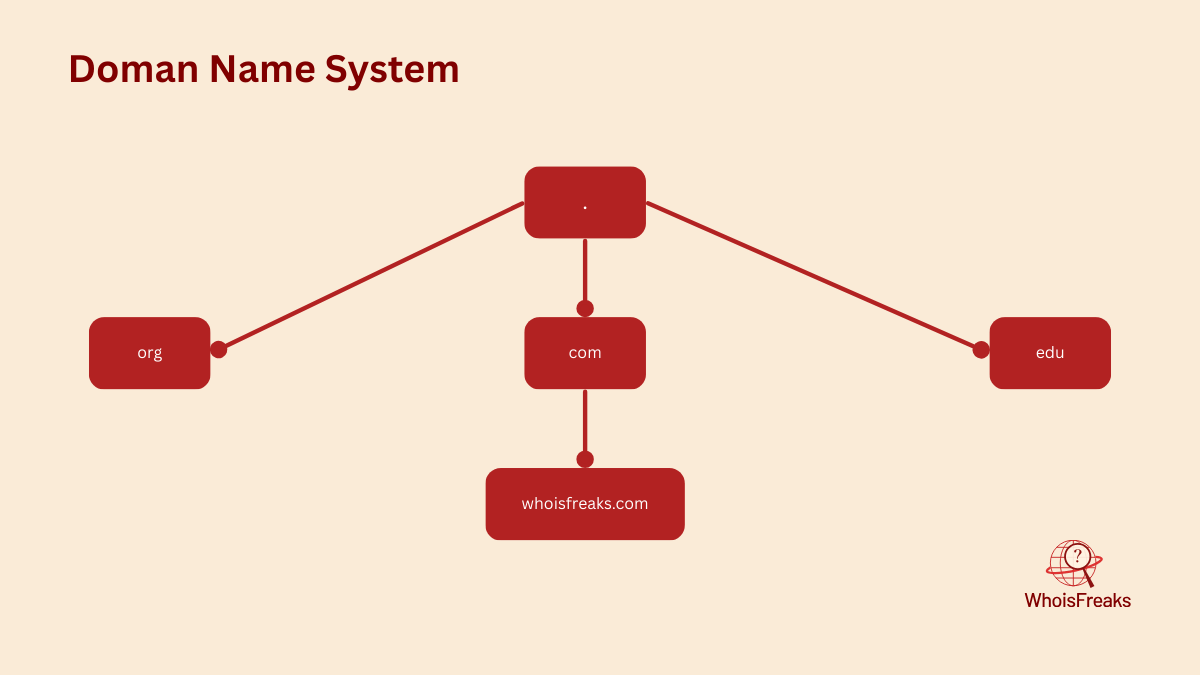
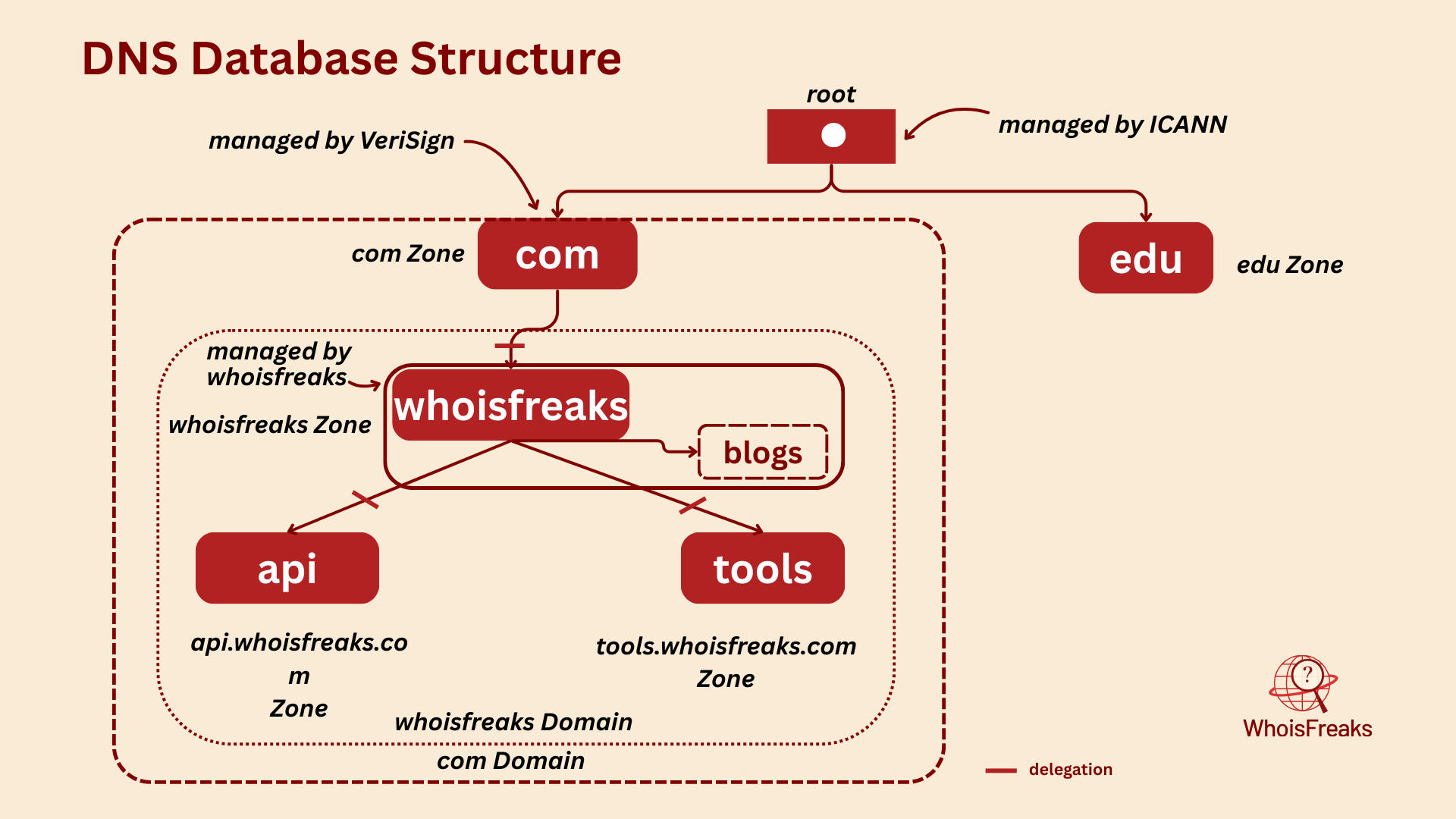
In DNS, each domain can be broken into a number of subdomains and responsibility for those subdomains can be doled out to different organizations. For example, an organization called Verisign managed com domain but delegates responsibility for the whoisfreaks.com to WhoisFreaks. Delegating authority creates a new zone. The zone whoisfreaks.com is now independent and only contains domains that ends with whoisfreaks.com. The zone com contains domains that ends with com but are not in delegated zones such as whoisfreaks.com. whoisfreaks.com domain may be further divided into subdomains such as tools.whoisfreaks.com, and some of these subdomains may themselves be separate zones, if the whoisfreaks.com administrators delegate responsibility for them to other organizations. If tools.whoisfreaks.com is a separate zone, the whoisfreaks.com zone doesn’t contain domain names that end in tools.whoisfreaks.com.
Domain names are used as indexes into the DNS database. You might think of data in DNS as “attached” to a domain name. In a filesystem, directories contain files and subdirectories. Likewise, domains can contain both hosts and subdomains. A domain contains those hosts and subdomains whose domain names are within the domain’s subtree of the namespace. Each host on a network has a domain name, which points to some information like ip address, mail routing etc. Hosts may also have one or more domain name aliases, which are simply pointers from one domain name (the alias) to another.
DNS is broken into smaller, independently managed pieces (zones/domains), but thanks to the client-server model, everyone can still find and access any part of it from anywhere. This hierarchical structure resolves the naming collisions that existed in the HOSTS.TXT file by ensuring that each domain maintains a unique namespace within its zone.
It’s like having a personal guide that knows the exact location of every website you want to visit. Without DNS, the internet as we know it would be a maze of numbers, virtually impenetrable to the average user.
The distributed database of DNS is indexed by domain names. Each domain name is just a path in a large inverted tree, called the domain namespace. According to RFC 1035, the depth of the DNS tree is theoretically limited to 127 levels, but a domain name can be no longer than 253 characters.
"DNS trees grow upside down, but real ones don’t — so please, plant trees the right way!"
whoisfreaks.com is called a domain name that you write on your favorite web browser. Each node in the DNS tree has a text label. The domain name at any node is the sequence of text labels from that node to the root separated by dot (.) i.e., whoisfreaks.com. Each text label can be up to 63 characters.
But wait — we don't actually include the root node dot (.) when writing domain names. When a dot is added at the end, it indicates that the domain name is absolute, specifying a node's exact location in the DNS hierarchy. An absolute domain name is also known as a Fully Qualified Domain Name (FQDN).
To avoid duplicates, a node's children cannot have the same text labels. However, a node can act as a pointer to another node — for example, products.whoisfreaks.com can point to tools.whoisfreaks.com. But the domain whoisfreaks itself cannot have multiple children with the same label. It's like a parent cannot give the same name to both of their children.
Subdomains share the same endings as their parent domain names. The subtrees branching from a node represent the subdomains of that node's label. For example, if API and mail are subtrees of whoisfreaks.com, then tools.whoisfreaks.com and products.whoisfreaks.com are subdomains of whoisfreaks.com. Domains are often referred by levels. These terms simply refer to a domain's position in the domain namespace:
A domain is a logical concept. Think of different domains like the tech domain, banking domain, or farming domain. In the domain namespace, a domain is simply a subtree within the larger DNS hierarchy. Any domain name within the subtree is considered part of the domain. Since a domain name can exist in multiple subtrees, it can also belong to multiple domains. For example, the domain name www.whoisfreaks.com is part of both the whoisfreaks.com domain and the com domain, as shown in the figure.
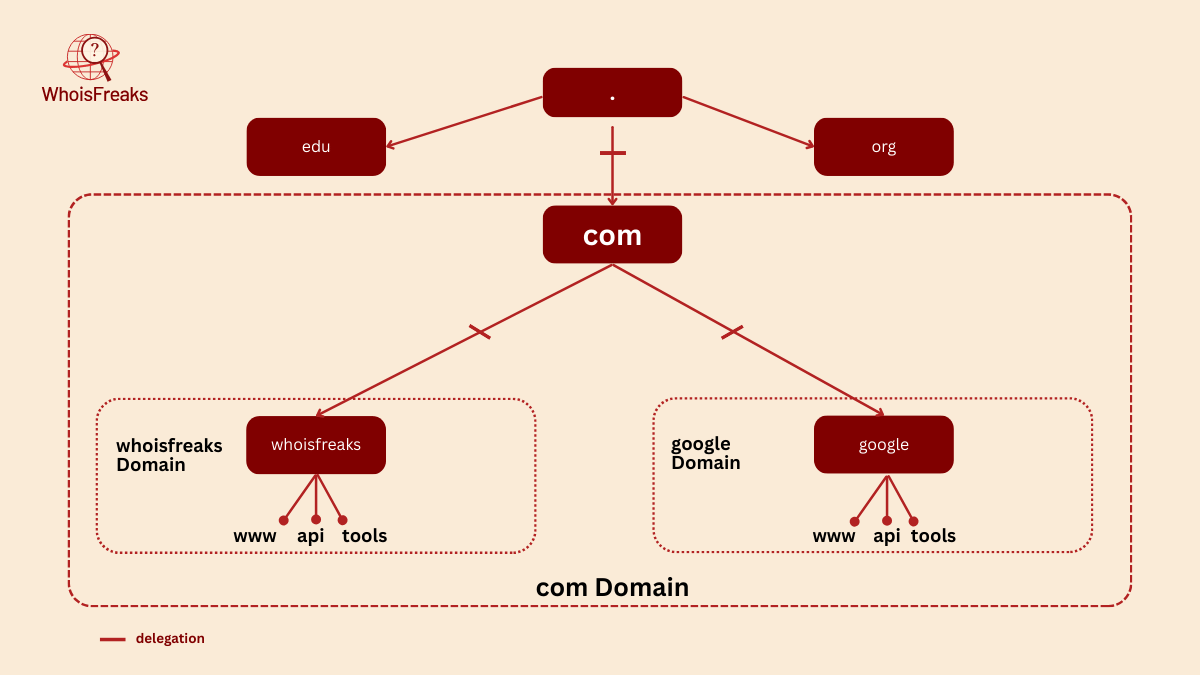
Domain names at the leaves of the tree represent individual hosts, and may point to network addresses and mail-routing information. Domain names in the middle of the tree can name a host and point to information about the domain. Interior domain names can represent both the domain they correspond to and a particular host on the network. For example, whoisfreaks.com is both the name of the WhoisFreaks Company’s domain and a domain name that refers to the hosts that run WhoisFreaks's main web server.
Domain names contain resource record data, which provides information such as IP addresses, mail servers, and more. This data is categorized into various classes (like IN for internet) and record types (such as A, MX, or CNAME). We’ll explore these in detail later. These records are essential for how DNS functions, helping users and systems locate services across the internet. Without them, domain names would be meaningless labels.
The Internet Corporation for Assigned Names and Numbers, or ICANN that manages the Domain Name System also creates and delegates top level domains. TLDs are divided into multiple categories like:
Delegation is the process of transferring the authority over a domain or its subdomains to another organization. Each domain can delegate the management of its subdomains to others, including the responsibility of maintaining DNS records and further subdividing them. These delegated entities can, in turn, delegate subdomains again. The parent domain keeps only the pointers to those delegated subdomains, so that it can refer queries there. This chain of delegation is what enables the decentralized structure of the DNS system. For example, the domain stanford.edu is delegated to the folks at Stanford who run the university's network.
Organizations don't always delegate their entire domain; they often retain control over parts that aren't covered by the delegated subdomains. For example, a domain like whoisfreaks.com may delegate tools.whoisfreaks.com and products.whoisfreaks.com to other entities, while still maintaining authority over blogs.whoisfreaks.com.
Nameservers are programs that store and manage information about the domain namespace. Each nameserver typically holds complete data for a specific portion of the namespace, known as a zone. This data is either loaded from a local zone file or obtained from another nameserver. When a nameserver holds authoritative data for a zone, it is said to be authoritative for that zone. A single nameserver can also be authoritative for multiple zones.
The particular node of the DNS tree is called a node. Every node is a zone and contains all information for its domain and any non-delegated subdomains. However, for delegated subdomains, the zone does not include their data. It only holds pointers to delegated subdomains to redirect query to them.
Nameservers load zones instead of domains: a domain may contain more information than the nameserver needs because it can contain data delegated to other nameservers. Since a zone is bounded by delegation, it will never include delegated data.
Delegating subdomains means the transfer of authority for a subdomain to different nameservers. A zone can have minimum of two nameservers. Your zone’s data, instead of containing information in the subdomain you’ve delegated, includes pointers to the nameservers that are authoritative for that subdomain. Now if one of your nameservers is asked for data in the subdomain, it can reply with a list of the right nameservers to contact.
DNS defines two types of authoritative nameservers: primary nameserver and secondary nameserver (also known as slaves).
A local zone file also called zone datafiles that contains information about resource records. Both types are fully authoritative for the zone. Slaves play a crucial role in ensuring redundancy, load distribution, and geographic proximity to clients. Administratively, they simplify DNS management by automatically updating from the primary when zone data changes.
A single nameserver can act as a primary for some zones and a slave for others, but it's common to refer to it by the role it serves for most of its zones.
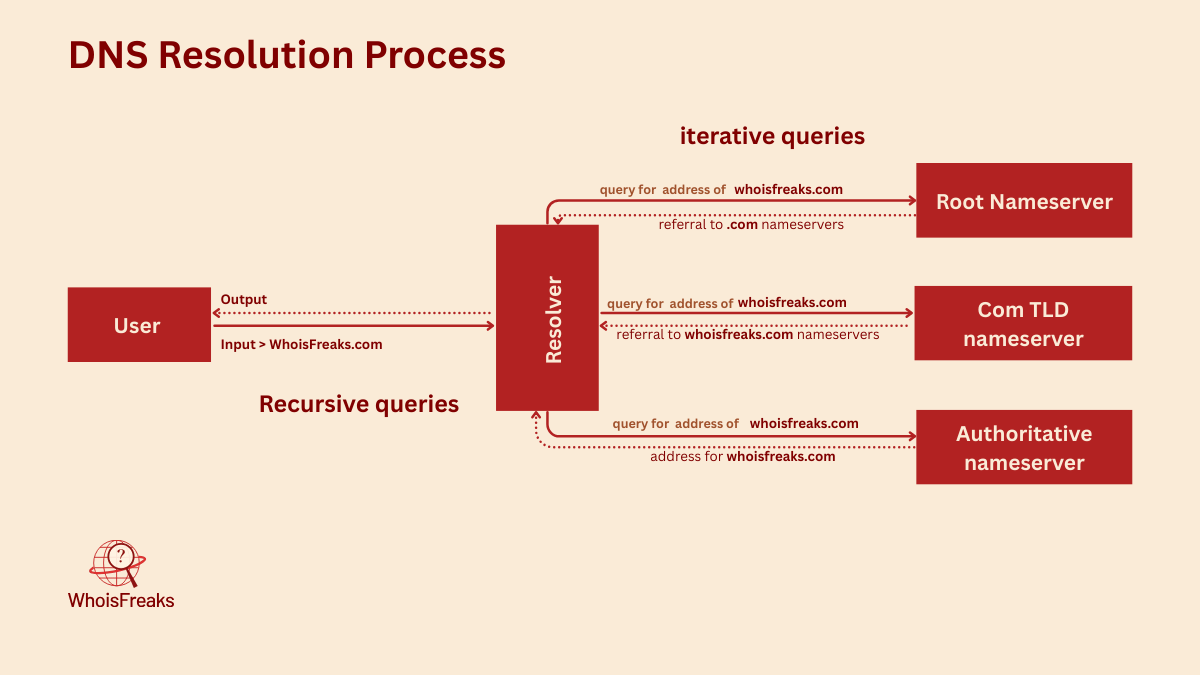
A DNS resolver acts as an intermediary between the user and the DNS system. When a user requests information about a domain name, the resolver initiates the query process by contacting nameservers, starting with the root servers. It follows the DNS hierarchy to retrieve the necessary resource records and then returns the results to the user.
The DNS resolution process involves interactions with root name servers, top-level domain (TLD) name servers, and authoritative name servers to retrieve resource records. The resolver is redirected from the root name servers to the appropriate TLD servers, and then to the authoritative name servers, which either return the requested records or indicate that the record does not exist.
There are 13 logical root name servers distributed globally, each backed by many physical servers. These servers handle requests and redirect them to the appropriate top-level domain (TLD) name servers.
When a DNS resolver receives a query for a domain name, it begins by contacting the root nameservers. These root nameservers don't have the final answer, but they do know which top-level domain (TLD) nameservers are authoritative for each TLD (like .com, .org, or country-specific zones). Some root nameservers may even be authoritative for certain generic TLDs themselves.
The resolver then sends the query to the appropriate TLD nameserver, based on the domain’s suffix. This TLD nameserver responds with a referral to the authoritative nameservers for the next level down—typically the second-level domain (e.g., example.com).
At each step in this process, the resolver queries a nameserver and either receives the final answer or is directed to a more specific nameserver. This iterative process continues until the resolver reaches the authoritative nameserver that can provide the exact DNS record requested.
The entire DNS resolution process—from the user to the authoritative server—involves two types of queries: recursive and iterative.
A recursive query begins when a user enters a domain name into a web browser. The request is sent to a recursive DNS server (also known as a resolver), which takes full responsibility for resolving the domain. It performs all necessary steps and returns the final IP address to the user.
In contrast, iterative queries occur behind the scenes during this resolution process. The recursive DNS server sends iterative queries to various DNS servers—starting with the root nameservers, then the top-level domain (TLD) nameservers, and finally the authoritative nameservers. Each of these servers either provides the answer or directs the recursive server to another nameserver that is closer to the final answer.
In summary, the recursive query is what the user initiates, and the iterative queries are what the recursive server performs to resolve the domain name.
DNS caching is a critical component of the DNS system, designed to enhance the speed of DNS lookups. By temporarily storing DNS data, caching allows devices to respond faster to queries, significantly improving website load times.
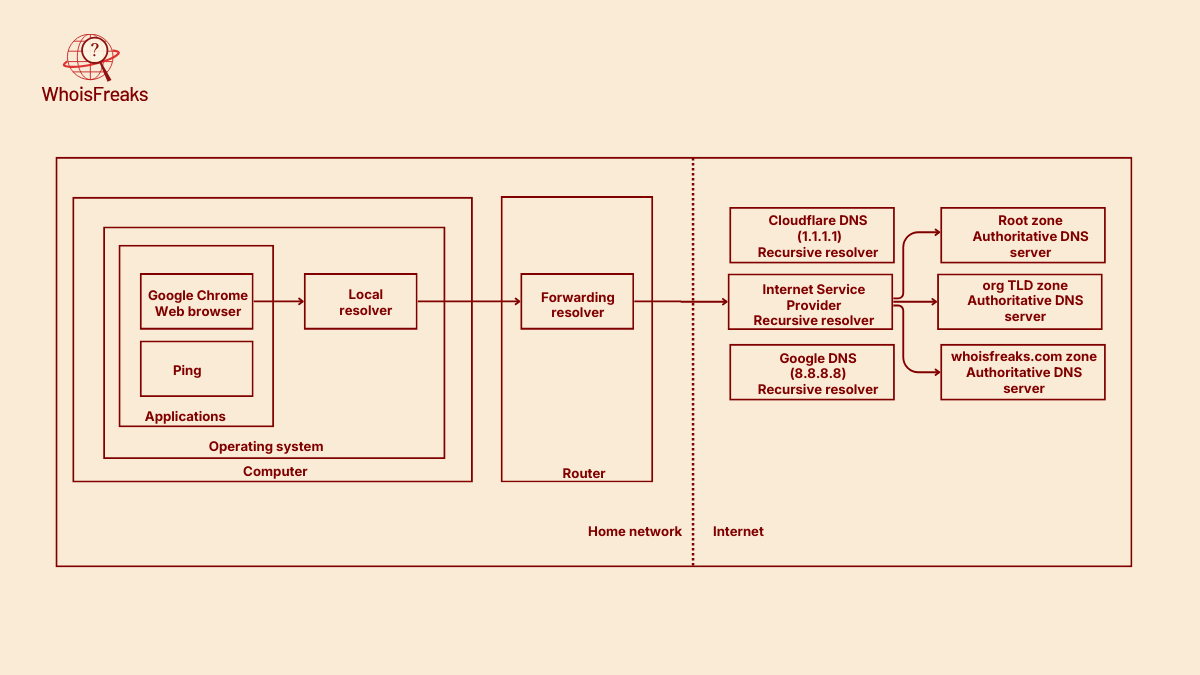
DNS caching occurs at multiple layers between the user and the authoritative DNS server. This includes caching by the client’s local resolver, browser, routers, and the Internet Service Provider (ISP) resolvers. Each of these components stores DNS records for a duration defined by the domain’s Time-To-Live (TTL) setting. However, some clients may ignore the specified TTL and instead apply their own caching policies.
The local resolver in an operating system is commonly known as a stub resolver. Its primary role is to forward DNS queries to another resolver—typically the router’s DNS resolver, an ISP’s DNS server, or a public DNS service like Google DNS or Cloudflare.
While stub resolvers are lightweight and don’t perform full DNS resolution themselves, they often maintain a small local cache of recently resolved DNS records. If a requested record is found in this cache, the stub resolver immediately returns the result to the application or command that initiated the DNS query, avoiding the need for external lookups.
The Time-to-Live (TTL) value determines how long a DNS record is stored in the cache before it must be refreshed. Each domain specifies its own Time-to-Live (TTL) value for DNS records. Regularly clearing your DNS cache is essential to prevent outdated website information, ensuring you have the most current DNS data. Effective management of DNS cache can lead to reduced redundancy and improved access times for websites.
What happens if a domain is not found? DNS zones define a negative caching value for such cases, specifying how long a "domain not found" response should be cached. This value is set in the Start of Authority (SOA) record, which is a type of DNS resource record. Each zone has its own SOA record with its own negative caching value.
Despite its efficiency, the Domain Name System is not without issues. Common DNS problems can disrupt user experience, such as DNS servers not responding or DNS cache poisoning. These issues can prevent devices from finding the correct IP addresses, leading to access errors and delays.
To ensure continued accessibility and avoid resolution errors, it’s crucial for website owners to regularly update their DNS records. Reliable DNS settings minimize the risk of lost traffic due to website downtime, maintaining a smooth user experience.
When a DNS server isn’t responding, it means that it has failed to return a result after a communication attempt. Several factors can contribute to this issue, including network problems, server misconfigurations, or high latency caused by server distance or network congestion.
Additionally, a distributed denial-of-service (DDoS) attack can overwhelm DNS servers, making them unable to respond to legitimate queries. Addressing these issues involves troubleshooting network settings, ensuring DNS server configurations are correct, and implementing security measures to protect against DDoS attacks.
DNS cache poisoning is a malicious tactic where corrupt DNS data is introduced into a resolver’s cache, causing incorrect IP address resolution. This can misdirect users to fraudulent websites, posing significant security risks, including DNS spoofing.
Preventing DNS cache poisoning involves implementing security measures like DNSSEC, which verifies the authenticity of DNS data.
Enhancing DNS security is vital to protect against threats like DNS cache poisoning and unauthorized modifications of DNS data. Implementing DNSSEC can verify the authenticity of DNS data, preventing tampering. Premium DNS services often offer advanced security features like DDoS protection and two-factor authentication, adding layers of security.
Regular updates to DNS server software are crucial for mitigating known vulnerabilities. Encrypting DNS queries with protocols like DNS over HTTPS (DoH) and DNS over TLS (DoT) ensures that your DNS traffic is secure from unauthorized access and tampering.
Continuous monitoring and traffic analysis help detect and respond to DNS threats in real-time.
Resource records are the fundamental data elements in the DNS. Each resource record has a type that defines the kind of data it holds—for example, an A record maps a domain to an IPv4 address, while an MX record specifies mail exchange servers. To retrieve this information, a user or system can perform a DNS lookup, which queries a DNS server to resolve a domain name into its corresponding resource records.
WhoisFreaks offers a comprehensive tool for DNS lookups, enabling users to retrieve various types of DNS records such as A, AAAA, NS, MX, SPF, and TXT. In addition to real-time lookups, WhoisFreaks also provides historical and reverse DNS lookup features. These tools are valuable for gaining insights into domain infrastructure and are especially useful for cybersecurity professionals and network administrators.
The Domain Name System is the backbone of the internet, linking easily remembered domain names to numerical IP addresses. Without DNS, users would need to memorize complex IP addresses for every website, which is impractical. Being part of the DNS ecosystem adds legitimacy to a website, improving its reputation and trustworthiness.
Unreliable DNS can lead to lost traffic and a poor user experience, highlighting the importance of maintaining accurate and secure DNS settings. Understanding and managing DNS effectively is crucial for ensuring a seamless and secure online experience.