
Tutorial
How to Unzip WhoisFreaks Database Files on Windows macOS and Linux

Written By Qasim, WhoisFreaks Team Published: September 02, 2026, Last Updated: September 02, 2026
Tutorial
Written By Qasim, WhoisFreaks Team Published: September 02, 2026, Last Updated: September 02, 2026
Every WhoisFreaks database download arrives compressed, .csv.gz for most datasets, .json.gz for the ASN WHOIS and IP WHOIS snapshots, and .zip for a few samples and geolocation builds. This guide shows you how to extract and verify those files on all three operating systems, and; because a full WHOIS snapshot expands to many times its download size; how to read the data without unpacking it at all.
Haven't downloaded a file yet? Follow the WHOIS database download guide to get your first snapshot, then come back here.
whois_2026-08-24.csv.gz, 2026-02-03_asn_whois_db_snapshot.json.gz or 2026-01-26_ip_to_city_db.zip..csv.gz can land as 15-20 GB of CSV. Check before you extract, not after.The two extensions look similar but behave differently, and picking the wrong tool is the single most common reason an extraction fails.
| Extension | What it is | Contains | Linux | macOS | Windows |
| .csv.gz | A single file compressed with gzip | One CSV. The name is just the filename minus .gz | ✓ | ✓ | ✗ |
| .json.gz | A single file compressed with gzip | One JSON or newline-delimited JSON file | ✓ | ✓ | ✗ |
| .zip | An archive that can hold many files | One or more CSV/JSON files plus a file listing | ✓ | ✓ | ✓ |
The practical difference: a .zip has an index you can list before extracting, a .gz does not; gzip is a compression wrapper around exactly one stream, so there is nothing to "browse".
Windows users, check this first; File Explorer hides known extensions by default, so whois.csv.gz may display as whois.csv and look like a spreadsheet you can double-click. Open View > Show > File name extensions and turn it on before you go any further.
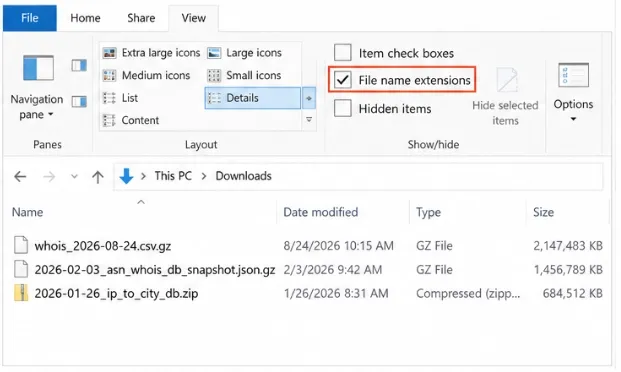
Windows opens .zip natively but has no built-in handler for .gz. Double-clicking a .csv.gz does nothing useful and dragging it into Explorer's zip viewer fails; it is not a zip.
Install 7-Zip, then right-click the file and choose 7-Zip → Extract Here. On Windows 11 you may need Show more options first to reach the 7-Zip submenu.
& "C:\Program Files\7-Zip\7z.exe" e whois_2026-08-24.csv.gz -o"C:\data"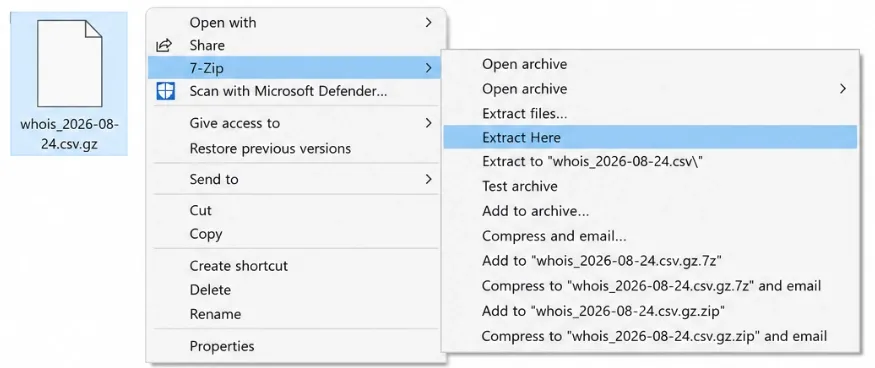
PowerShell can decompress gzip through .NET, which is useful on locked-down machines where you cannot install software:
$in  = "C:\data\whois_2026-08-24.csv.gz"
$out = "C:\data\whois_2026-08-24.csv"

$inStream  = [System.IO.File]::OpenRead($in)
$outStream = [System.IO.File]::Create($out)
$gzip = New-Object System.IO.Compression.GZipStream($inStream, [System.IO.Compression.CompressionMode]::Decompress)
$gzip.CopyTo($outStream)
$gzip.Dispose(); $outStream.Dispose(); $inStream.Dispose()
For .zip files, PowerShell has a one-liner and needs no third-party tool at all:
Expand-Archive -Path "C:\data\2026-01-26_ip_to_city_db.zip" -DestinationPath "C:\data\ipgeo"
Do not plan on opening the result in Excel. A worksheet caps at 1,048,576 rows, which a full WHOIS or DNS snapshot passes within the first fraction of the file. Excel will open it, truncate it silently at the limit, and give you a subset you may not notice is incomplete. Load these files into a database or read them with code instead.
macOS handles both formats without any extra software.
In Finder: double-click the file. Archive Utility decompresses it into the same folder and leaves the original in place. That is all most people need.
gunzip -k whois_2026-08-24.csv.gz    # keep the originalgzcat
whois_2026-08-24.csv.gz | head -5    # peek without extracting

unzip 2026-01-26_ip_to_city_db.zip -d ~/Downloads/ipgeo/
Note that macOS uses gzcat where Linux uses zcat; gzip -dc works identically on both if you want one command for your notes.
Safari gotcha. With "Open safe files after downloading" enabled, Safari silently decompresses .gz downloads for you and saves the result without the .gz suffix. If your file is already plain CSV and far larger than the size the dashboard quoted, this is why; it is not corrupt. Turn the setting off in Safari > Settings > General if you script against exact filenames.
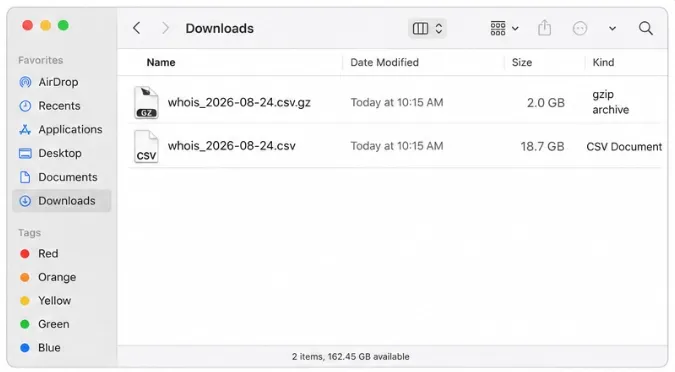
gzip ships with every mainstream distribution, so there is nothing to install.
# Decompress and KEEP the original .gz (-k), which you want if the download was slow
gunzip -k whois_2026-08-24.csv.gz

# Or write the output wherever you like
gzip -dc whois_2026-08-24.csv.gz > /mnt/data/whois.csv
Without -k, gunzip deletes the .gz once it finishes. On a 20 GB download that is a painful mistake to undo.
For a .zip, list the contents first, then extract:
unzip -l 2026-01-26_ip_to_city_db.zip      # see what's inside
unzip 2026-01-26_ip_to_city_db.zip -d ./ipgeo/
If unzip is missing, install it with sudo apt install unzip (Debian/Ubuntu) or sudo dnf install unzip (Fedora/RHEL).
Interrupted downloads are common on multi-gigabyte files and produce archives that extract partially rather than failing outright. Test the archive first:
gzip -t whois_2026-08-24.csv.gz && echo "OK"    # Linux / macOS
unzip -t 2026-01-26_ip_to_city_db.zip           # zip equivalent
On Windows, 7z t whois_2026-08-24.csv.gz does the same job.
If the test fails, download the file again rather than trying to salvage it - a truncated CSV loses whole rows at the tail, and nothing downstream will warn you.
This is the part most guides skip, and for WhoisFreaks-sized data it is usually the right answer. Every common tool reads gzip directly, so you can skip the 20 GB intermediate file entirely.
# First 5 rows, including the header
gzip -dc whois_2026-08-24.csv.gz | head -5

# Count records without unpacking
gzip -dc whois_2026-08-24.csv.gz | wc -l

# Filter straight into a much smaller working file
gzip -dc whois_2026-08-24.csv.gz | grep -i '\.com,' | gzip > whois-com.csv.gz
In Python, gzip.open() in text mode streams row by row at constant memory, whatever the file size:
import csv, gzip

with gzip.open("whois_2026-08-24.csv.gz", "rt", encoding="utf-8",
               errors="replace", newline="") as fh:
    for row in csv.DictReader(fh):
        print(row["domain_name"], row["expiry_date"])
        break
For the .json.gz snapshots, check the shape before you parse - a single JSON array and newline-delimited JSON need different handling:
gzip -dc 2026-02-03_asn_whois_db_snapshot.json.gz | head -c 200A leading [ means one large array (stream it with jq --stream or ijson); a leading { on every line means newline-delimited JSON, which you can read one line at a time.
| Symptom | Cause | Fix |
| not in gzip format | The download saved an error response, not data | Run gzip -dc file.csv.gz | head -c 200. A JSON body with timestamp, status, error and message is an API error envelope; usually a bad API key or an expired subscription |
| unexpected end of file | Truncated download | Re-download; check gzip -t before extracting |
| Windows can't open the file | No native .gz support | Use 7-Zip or the PowerShell script in Step 4 |
| Extracted file is far smaller than expected | Disk filled mid-extraction | Free space, then extract again; a partial write is not flagged as an error |
| Excel shows exactly 1,048,576 rows | Excel's hard row limit | Use a database, DuckDB or Python instead |
| gzip -l reports a nonsensical size | gzip stores the uncompressed size modulo 4 GB | Ignore it on large files; measure after extraction |
| Task | Linux | macOS | Windows |
| Extract .gz | gunzip -k file.gz | gunzip -k file.gz or double-click | 7-Zip > Extract Here |
| Extract .zip | unzip file.zip -d dir/ | unzip file.zip -d dir/ or double-click | Expand-Archive |
| Peek inside | zcat file.gz | head -5 | gzcat file.gz | head -5 | 7z x -so file.gz | more |
| Verify | gzip -t file.gz | gzip -t file.gz | 7z t file.gz |
Compression is the reason a full-database subscription is practical to move at all - the same snapshot that ships as a few gigabytes would be an impossible download uncompressed. Once you are comfortable streaming the file rather than unpacking it, size largely stops mattering. See the WHOIS Database, DNS Database and IP Reputation Database product pages for what each snapshot contains, and the Database Files Status endpoint to check freshness before your pipeline downloads anything.
Because WHOIS and DNS data is highly repetitive text, which typically compresses six to ten times. A snapshot that ships as a few gigabytes would be tens of gigabytes uncompressed, and that difference decides whether a daily pipeline can realistically pull the file at all. Compression happens once on our side and costs you a few seconds of CPU on yours.
No. Neither reads gzip, so you have to extract the CSV first; and once you do, both will hit a row limit long before a full snapshot ends. Excel caps at 1,048,576 rows and truncates silently rather than warning you. Load the file into PostgreSQL, DuckDB, or a Python script instead, and export the subset you need to a spreadsheet from there.
A .gz compresses exactly one file and stores nothing else; no file list, no folder structure, which is why the name is simply the original filename plus .gz. A .zip is a container that can hold many files with a browsable index, which is why you can list a zip's contents before extracting but cannot do the same with a gzip. Practically, Windows opens .zip natively and needs a tool such as 7-Zip for .gz.
Usually not. PostgreSQL can take a decompressed stream via zcat file.csv.gz | psql -c "COPY table FROM STDIN CSV HEADER", DuckDB reads read_csv_auto('file.csv.gz') directly, and Python's gzip.open() streams row by row at constant memory. Skipping the intermediate file saves both the disk space and the time spent writing it.
The file almost certainly is not database data. Run head -c 200 on it: if you see a JSON body containing timestamp, status, error and message, the download saved an API error response, most often from an invalid API key or a cancelled subscription. If you see HTML, a proxy or captive portal intercepted the request. Fix the underlying request and download again.
Plan for six to ten times the compressed size and confirm you have it before starting. Extraction that runs out of space leaves a partial file behind without raising an error, so the result looks valid and is quietly incomplete. If the space is not there, stream the file instead of extracting it; filtering to the TLDs or columns you need will usually shrink it by an order of magnitude.
The commands here are the standard gzip and zip toolchain, tested against the file naming WhoisFreaks actually publishes - 2026-01-26_ip_security_db.csv.gz, 2026-02-03_asn_whois_db_snapshot.json.gz and 2026-01-26_ip_to_city_db.zip as they appear in our API documentation.
Two pieces of advice here exist because they cost customers' real time. Extracting with plain `gunzip` deletes the source archive, which on a slow multi-gigabyte download means downloading it twice. And opening a database snapshot in Excel silently truncates it at 1,048,576 rows, producing analysis that looks complete and is not. Both are avoidable in one keystroke.
Run a DNS lookup on any domain with the WhoisFreaks DNS API. Get A, AAAA, NS, MX, TXT, SOA and SPF records in one JSON response, with cURL examples you can copy.
11 min read
Find registered typosquatting domains targeting your brand with the WhoisFreaks Domain Typosquats API - keyword scans, wildcard patterns, paging and triage.
11 min read