Guide
What Is a Whaling Phishing Attack?

Written By Usama Shabbir, WhoisFreaks Team Published: December 26, 2024, Last Updated: August 26, 2026
Guide
Written By Usama Shabbir, WhoisFreaks Team Published: December 26, 2024, Last Updated: August 26, 2026
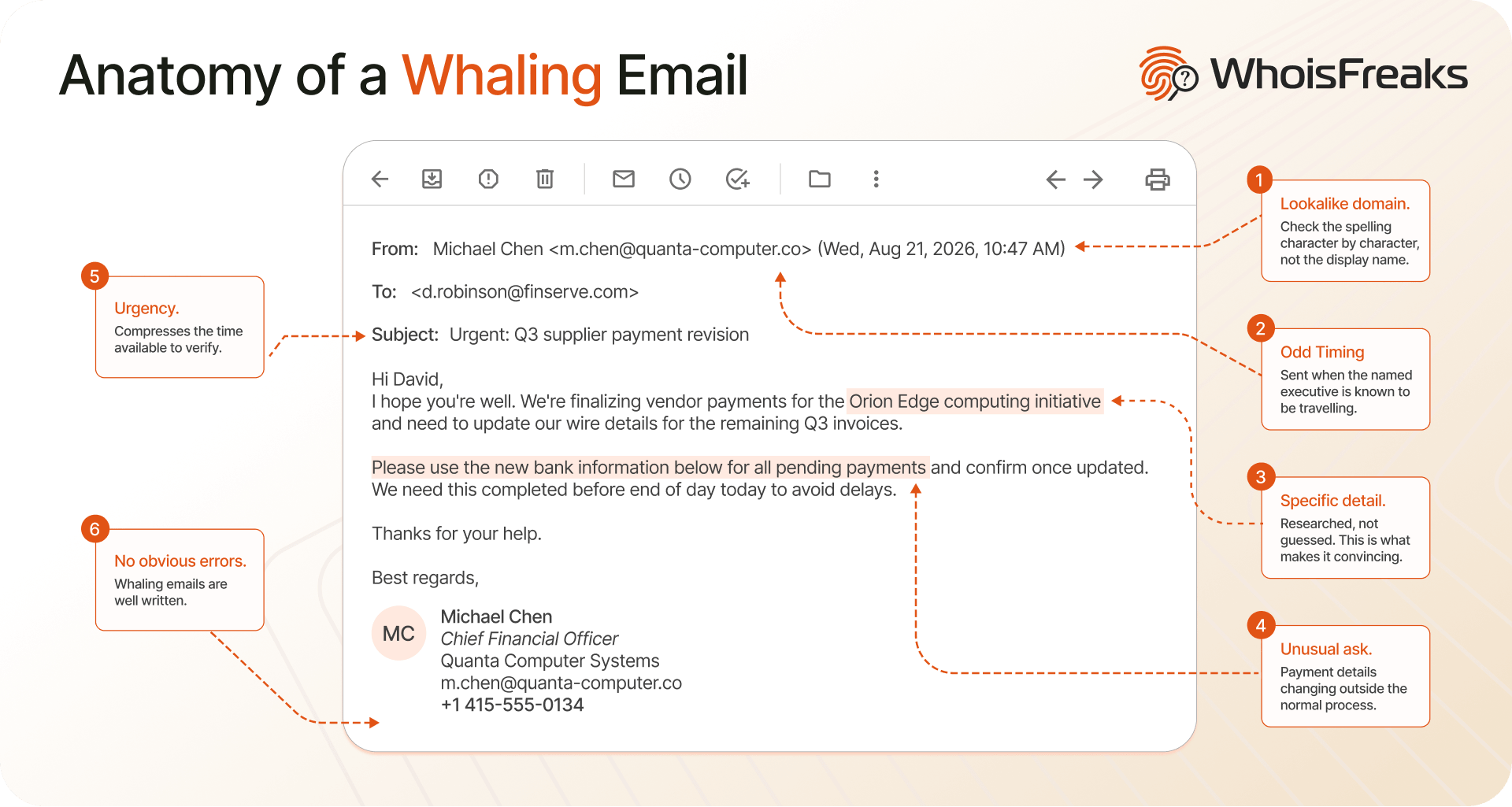
A whaling attack is a phishing attack aimed at a specific senior executive, usually one who can authorise a payment or release sensitive records. The attacker impersonates someone the target already trusts, a chief executive, a supplier, a law firm, and asks for something that would be routine if the request were real.
What separates whaling from ordinary phishing is preparation. There is no mass mailing and no obvious spelling errors. The attacker researches the target's reporting lines, current deals, and travel, then sends one message to one person at a moment when the request makes sense.
The financial weight sits behind this category. In the FBI's 2024 Internet Crime Report, business email compromise, the broader category whaling belongs to, accounted for $2.77 billion in reported losses across 21,442 complaints, second only to investment fraud in total dollars.
This chapter covers how the attack is built, how it differs from spear phishing, and the one check that separates a real executive request from an impersonated one.
These two get used interchangeably and they are not the same thing. The distinction matters because it changes who needs training and which controls actually help.
| Spear phishing | Whaling | |
|---|---|---|
| Target | A defined group: a department, a role, a customer segment | One named individual, usually C-suite or the people who act for them |
| Volume | Tens to hundreds of recipients | Typically one |
| Research depth | Role and company level | Individual: reporting lines, current deals, calendar, travel |
| Typical ask | Credentials, a document, a link click | A wire transfer, payroll change, or confidential file release |
| Impersonated party | A vendor, IT, or an internal system | A named executive, lawyer, or supplier the target knows |
The practical consequence is that whaling defeats controls built for volume. Filters tuned to catch patterns across many messages have nothing to pattern-match on when the attacker sends one message. Awareness training aimed at "look for spelling mistakes" also fails, because a whaling email is usually well written.
What does not change is the infrastructure. The attacker still needs a domain to send from, and that domain still has a registration record.
These attacks are highly personalized and often involve extensive research on the target to make the scam as convincing as possible. The goal is to deceive the victim into disclosing sensitive information, transferring funds, or granting access to restricted systems or data. The anatomy of a whaling attack typically involves several key phases, each meticulously designed to deceive the target and achieve the attacker's objectives. Here's a brief overview;
In January 2016 an employee in the finance department at FACC AG, an Austrian aerospace parts manufacturer supplying Airbus and Boeing, received an email appearing to come from chief executive Walter Stephan. It requested a transfer for an acquisition project that did not exist. The employee wired roughly 50 million euros.
FACC stopped 10.9 million euros before it left the receiving accounts and recorded a 41.9-million-euro charge in its 2015/16 results, per Trend Micro's analysis of the incident. The company called it the "Fake President Incident". The chief financial officer was dismissed in February 2016 and Walter Stephan in May, after seventeen years as chief executive.
One detail is worth holding onto. The executive who was impersonated is not the person who was deceived. Whaling targets the authority of a senior name, then exploits it against whoever acts on that name's instructions. Training the executive alone does not close it.
Every explainer on this topic ends with the same advice: verify the request through a separate channel. That is correct and it is also incomplete, because it puts the entire burden on the recipient noticing something felt wrong. There is a check that does not depend on instinct. A whaling email arrives from a domain, and that domain has a registration record that either supports the story or does not.
An attacker taking control of a domain you own is a different problem with a different response, covered separately in protecting yourself from domain hijacking.
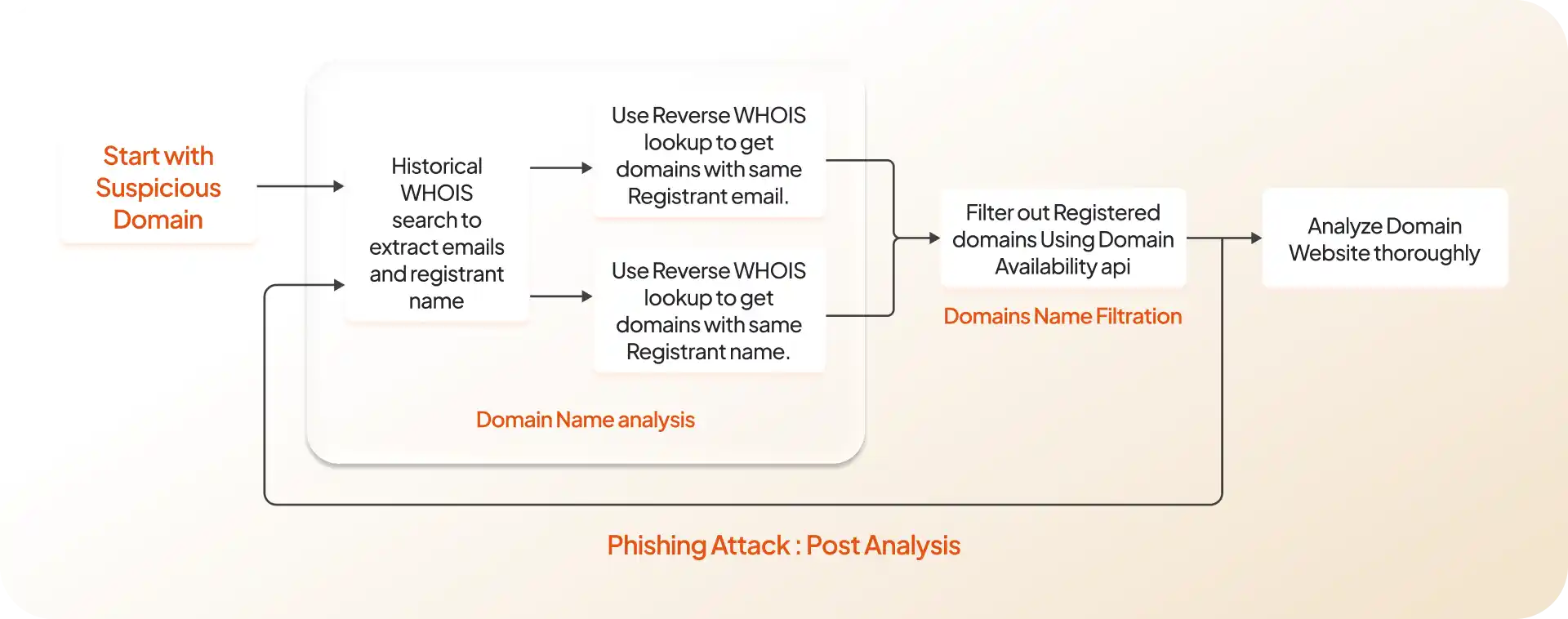
The incoming email's domain belongs to 'xyz.com' as indicated in the live lookup registrant information, the next step involves conducting a reverse query on [email protected]. This process entails identifying the domains associated with the above email. Following that, a thorough examination is carried out to determine if any of the registered domains are linked to malicious activities. If any such association is identified, it raises a red flag for that specific domain. This additional layer of analysis aims to enhance the scrutiny of potentially suspicious domains and strengthen the overall security assessment.For a more comprehensive analysis, additional tools such as reverse company search and reverse owner name search can be employed.
Running these four checks by hand works for a single suspicious email. Across an organisation, brand monitoring watches for newly registered domains resembling yours and alerts on registration changes, so the lookalike is flagged before it is used rather than after.
Set the SPF record to stop your own domain being used to impersonate you, publish a correct SPF record listing the servers permitted to send on your behalf. This does not protect you from whaling emails sent by lookalike domains, which is a separate problem, but it does close the easier route of an attacker spoofing your actual domain. SPF is an email authentication method designed to detect forging sender addresses during the delivery of the email. By creating an SPF record for your domain, you tell the world which mail servers are authorized to send email on behalf of your domain.
An attacker taking control of a domain you own is a different problem with a different response, covered separately in protecting yourself from domain hijacking.
The most instructive whaling case on record is also the most expensive, and its method maps directly onto everything above.
Evaldas Rimasauskas registered a company in Latvia bearing the same name as an Asian computer hardware manufacturer that his targets already did business with, then sent fraudulent invoices from addresses built to match. Two US internet companies wired more than $120 million to accounts he controlled. He was sentenced to five years by the Southern District of New York, ordered to forfeit $49.7 million and pay $26.5 million in restitution.
The Department of Justice identifies the victims only as a multinational technology company and a multinational online social media company. They were reported as Google and Facebook after a Lithuanian court order was made public.
The mechanism is the point. Rimasauskas did not breach anything. He registered a name that looked like a name the targets already trusted, and the invoices went through normal accounts payable because nothing about them looked unusual. The whole attack ran on a registration that anyone could have checked and nobody did.
Finding one malicious domain is the start, not the finish. Attackers register in batches, and the registration record on the domain you caught usually leads to the rest of the batch. This is that process run end to end on a real case.
The starting point was a single URL, qudscouncil.com/cd/AP/Signin, hosting a page built to capture Apple account credentials. One domain, no other context.
Source: WhoisFreaks WHOIS and reverse WHOIS databases. Investigation conducted on DEC 2024. Domain counts reflect the database at that time and will differ if the queries are re-run today.
Step 1. Pull the registration history. Run a WHOIS history lookup on the starting domain and extract the registrant email addresses and registrant or company name. Historical records matter more than current ones here, because privacy protection is often applied later in a domain's life while earlier snapshots still carry the original details. We found the following two email [email protected] and [email protected].
Step 2. Pivot on the registrant emails. Run a reverse WHOIS search on each email address recovered in step 1. Those two addresses returned a further 41 domains registered by the same party.
Step 3. Filter to what is still live. Run a live WHOIS lookup across all 41 and separate the currently registered from the lapsed. Only 6 of the 41 were still registered: jaghorizeba.com, orps.af, aburayhan.net, aburayhan.org, kabulweb.com, and qudscouncil.com.
This ratio is the useful part. Most of an attacker's portfolio is already dead by the time you find one live domain, which is why the pivot has to happen quickly and why historical records matter more than current ones.
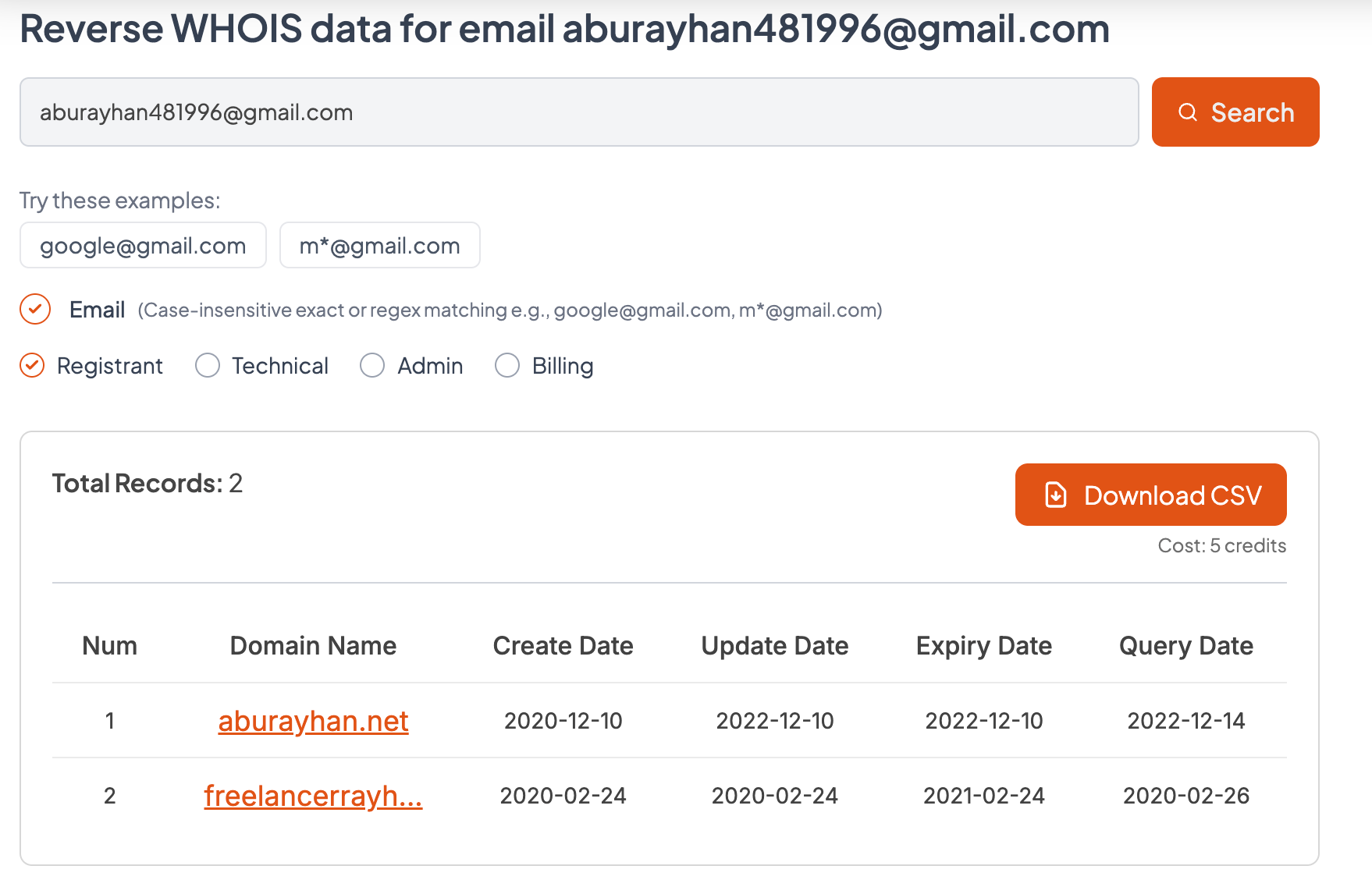
Step 4. Repeat the pivot on the newly found domains. Running the same historical lookup for domains found in step 3 and reverse WHOIS search against the six surviving domains surfaced further registrant addresses([email protected] and [email protected]), and those returned one more domain: freelancerrayhan.com.
Step 5. Inspect what the surviving domains are actually serving. Registration data tells you the domains are related. It does not tell you what each one does. Loading them showed that kabulweb.com hosts a sign-in page built to harvest WordPress credentials, a different target from the Apple credential page the investigation started on.
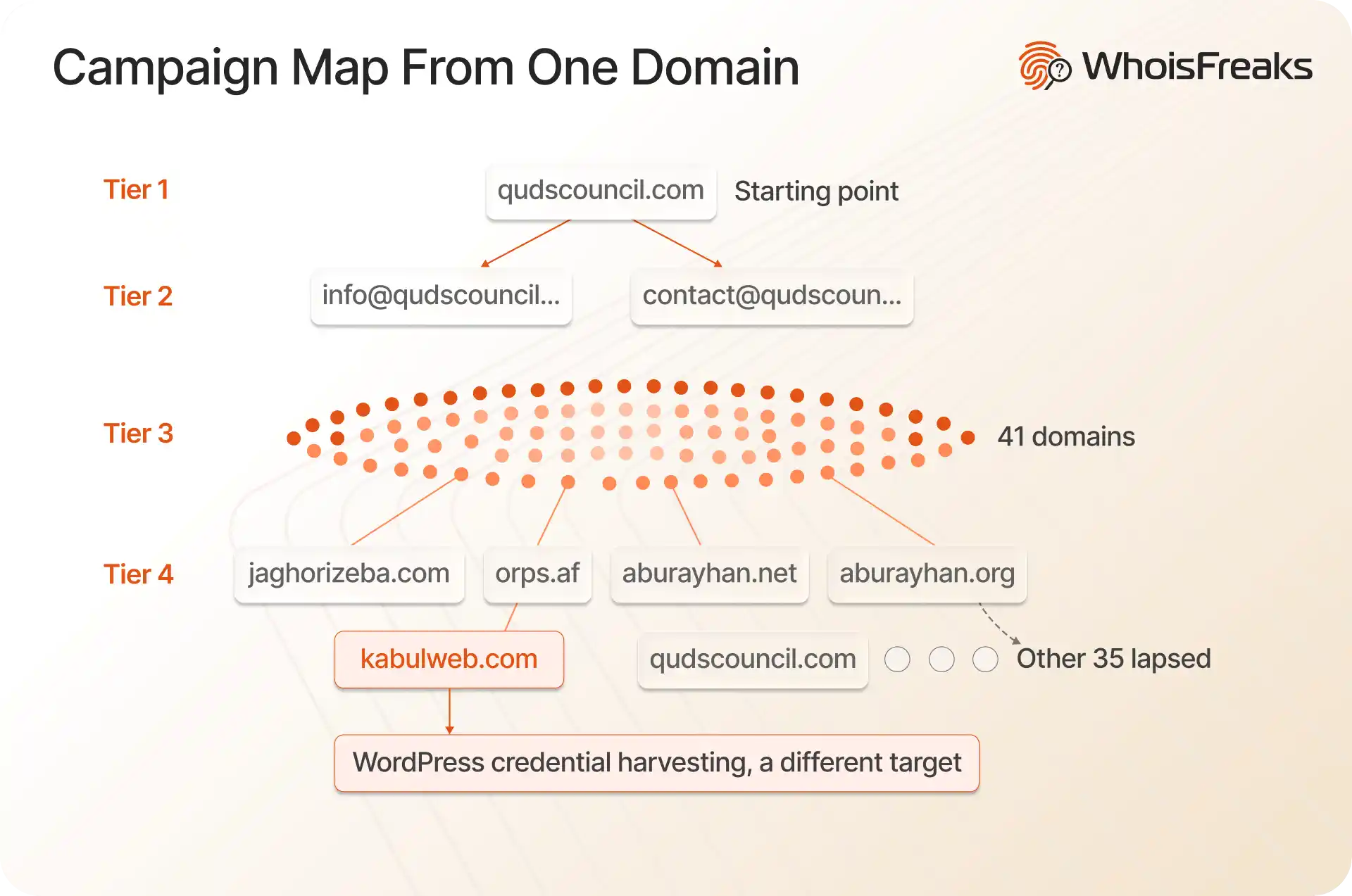
That is the finding worth the effort. The starting domain looked like a single Apple phishing page. The registration trail showed one operator running credential harvesting against at least two unrelated platforms, which changes both the scope of the incident and what you block.
The same sequence can be run against the registrant name rather than the email address, which catches cases where an operator varies the address but reuses the name. Where registrant details are redacted by a privacy service, neither pivot is available, and the nameserver becomes the more reliable link between domains.
To run this at scale rather than by hand, the same fields are exposed through the reverse WHOIS API.