
Tutorial
How to Increase Your API Rate Limits on WhoisFreaks

Written By Qasim, WhoisFreaks Team Published: September 25, 2026, Last Updated: September 25, 2026
Tutorial
Written By Qasim, WhoisFreaks Team Published: September 25, 2026, Last Updated: September 25, 2026
If your integration returns 429 Too Many Requests while you still have API credits left, you have hit your API rate limit, not your quota. You can raise your requests per minute from the billing dashboard with a rate-limit add-on, without upgrading your plan. This guide covers the flow, the pricing formula, and how to cancel.
Not sure which limit you hit? Read how API rate limiting works first.
| Symptom | Cause | Fix |
| 429 Too Many Requests, credits remaining | Requests sent faster than your per-minute allowance | Rate-limit add-on (this guide) |
| Requests refused, credits at zero | Query quota spent for the period | Buy credits or change plan |
A throttled request returns 429 and does not consume a credit. If you would rather absorb 429s in code than pay for headroom, see handling API rate limits and errors.
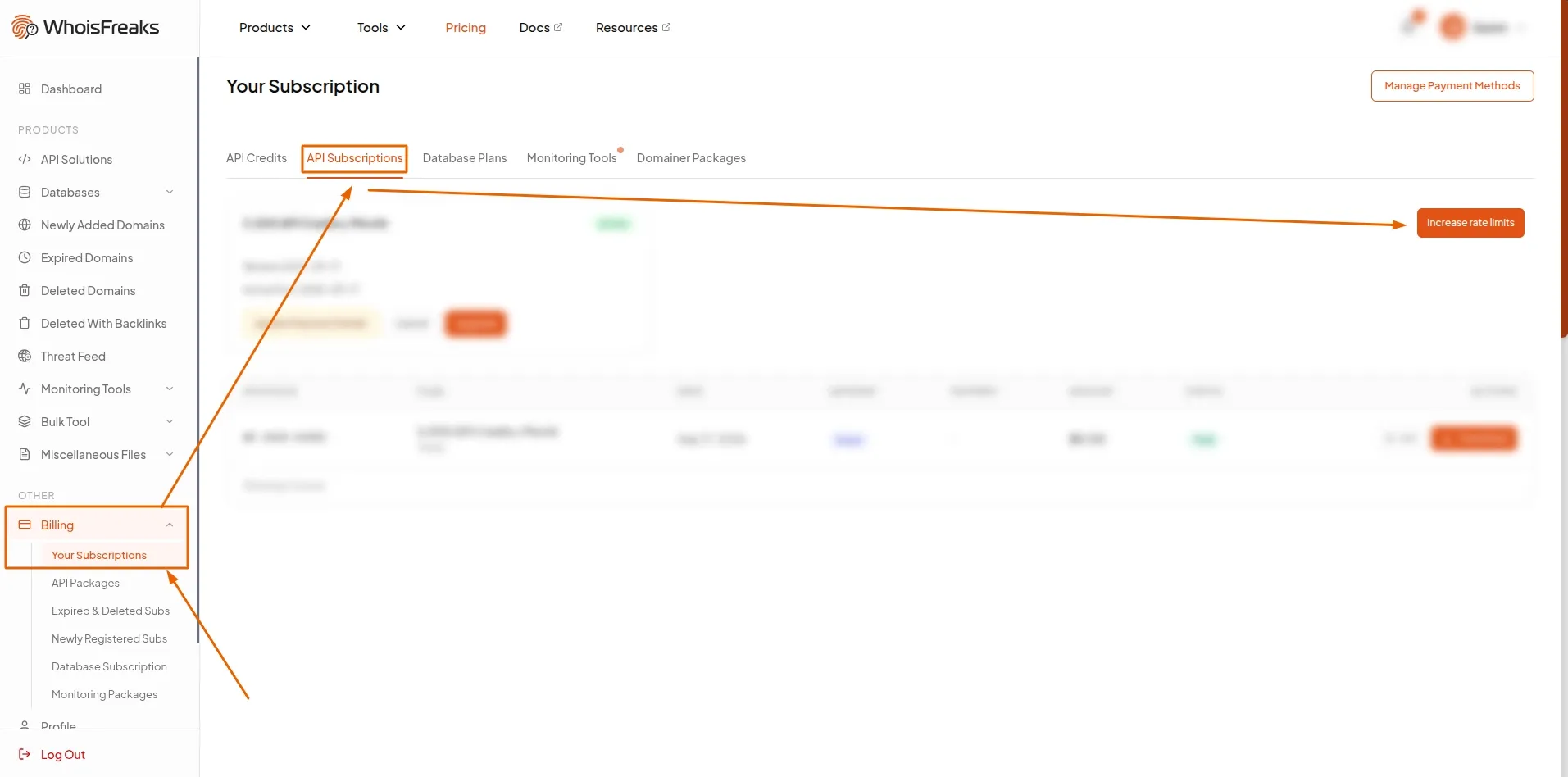
Sign in to the WhoisFreaks dashboard, go to Billing > Your Subscriptions, and select the API Subscriptions tab.
Beside your plan card is a Rate limits card, labelled API plan limits & add-ons. Everything below happens there.
Rate limits are enforced per endpoint category, not globally, so 429s on historical queries are unrelated to your live lookup volume. Click Show rate limit Map in the dialog to see this in the dashboard:
| Category | Endpoints |
| Live | WHOIS, DNS, ASN, IP WHOIS, IP Geolocation, IP Security, Domain Availability, Domain Reputation lookups |
| DB | WHOIS and DNS historical and reverse, Subdomains, Domain Typos |
| Bulk | WHOIS bulk, DNS bulk, Domain Availability bulk, IP Geolocation bulk, IP Security bulk |
Read x-ratelimit-allowed-requests off a real response to confirm the category ceiling you are hitting:
curl -s -D - -o /dev/null "https://api.whoisfreaks.com/v2.0/whois/live?apiKey=YOUR_API_KEY&domainName=whoisfreaks.com"Click Increase rate limits on the card. Three fields open, each pre-filled with your plan's limit.
Enter the total requests per minute you want, not the amount to add. On the 5,000-credit plan (20 live rpm), type 100 to get 100, and the dashboard derives the increment of 80.
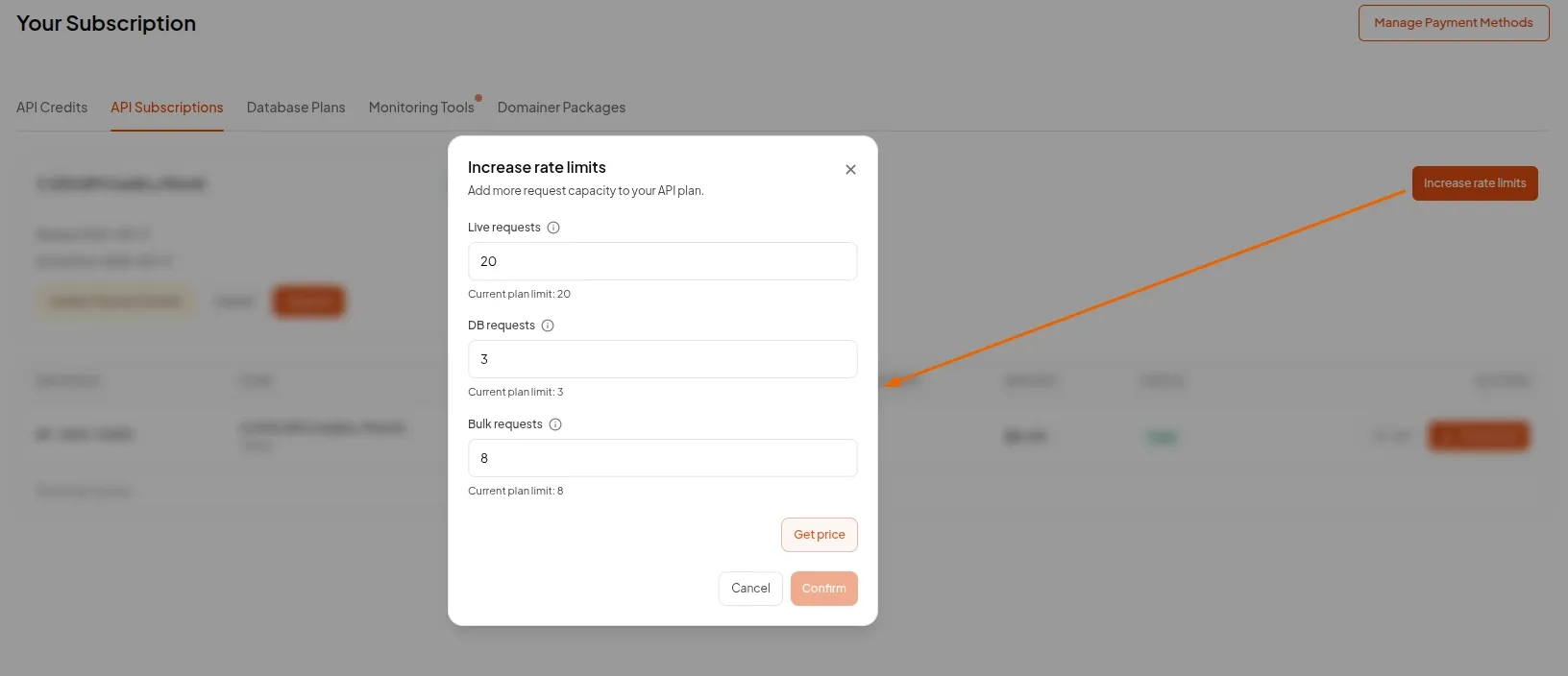
Click Get price. Nothing is charged yet. Confirm stays disabled until you price the change, so you always see the number first.
You get an Estimated total plus one of three invoice messages:
| Message | Meaning |
| "You will be charged $X immediately..." | $X is the difference between this add-on and the priciest add-on you have had here |
| "You will be invoiced $5.00 immediately..." | That difference fell under $5.00. Immediate add-on invoices have a $5.00 floor |
| "You won't be charged anything immediately." | You are at or below an add-on already paid for, so nothing new is due today |
The Estimated total is the recurring amount added to every invoice, monthly or yearly to match your plan. It is not prorated, and it already reflects any coupon on your subscription.
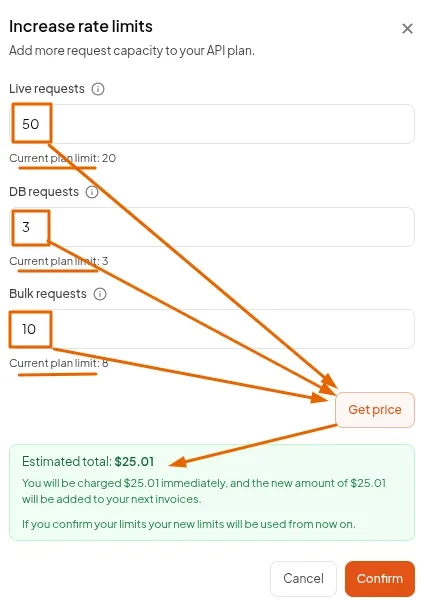
Click Confirm. The add-on is created on your subscription, the immediate invoice is charged if there is one, and your API key's limits are rewritten and pushed to the API gateway.
New limits apply immediately. No key rotation, no waiting for the next billing cycle. Your next response already reports the new x-ratelimit-allowed-requests.
If the charge fails, the add-on is rolled back, and nothing is applied. Failures surface as a generic "There was an error. Please contact support." toast.
The card then shows Rate limit add-on active with your price and a per-category breakdown:
Live: 20  +80  = 100
DB:   3   +0   = 3
Bulk: 8   +0   = 8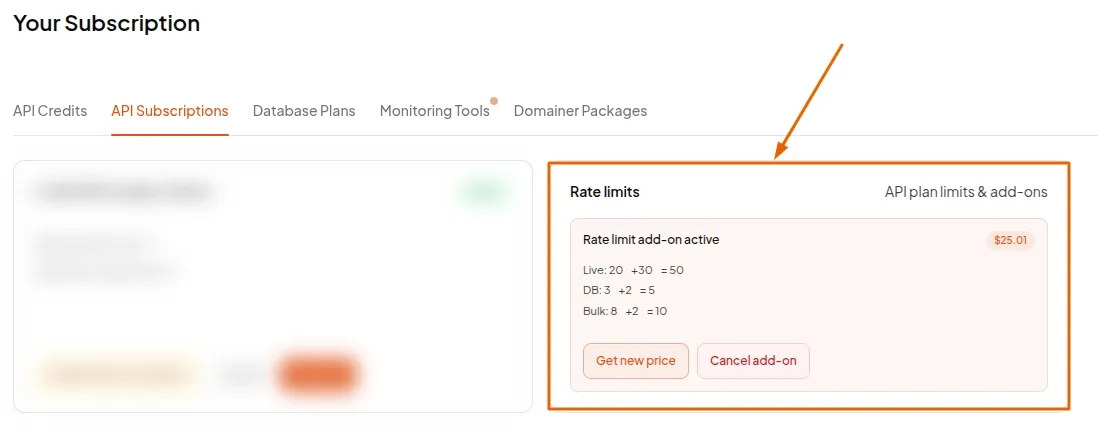
An add-on is priced as a proportion of the plan you are already on, not from a per-request price list.
Convert limits into capacity units:
| Category | Units per 1 rpm |
| Live | 1 |
| Bulk | 4 |
| DB (historical, reverse, subdomains, typos) | 6 |
Apply the formula:
add-on price = 0.35 × plan rate × (units added / plan units)Worked example, 5,000-credit plan at $10/month (Live 20, Bulk 8, Hist/Rev 3), raising Live to 100:
plan units  = (20 × 1) + (8 × 4) + (3 × 6) = 70
units added = 80 live × 1                  = 80

price = 0.35 × $10.00 × (80 / 70)
      = $4.00...  ->  $4.01 per month
Cents always round up, which is why an apparently exact $4.00 bills as $4.01.
| Change on the 5,000-credit plan | Add-on price |
| Live 20 -> 100 | $4.01 / month |
| Bulk 8 -> 18 | $2.00 / month |
| Historical/Reverse 3 -> 8 | $1.51 / month |
Three things follow from the formula:
Get price stays authoritative, because it also applies your coupon. Use the formula to budget.
Only one add-on runs per subscription, so raising limits again replaces it rather than stacking.
To update: click Get new price. The fields reset to your plan limits, not your current effective limits, so enter totals measured from the plan baseline. Price it, then click Update limits. You are charged only the difference.
To cancel: click Cancel add-on, then Confirm cancel. The line item comes off your next invoice straight away, but your raised limits stay until your subscription renews, since you have already paid for the period. At renewal your API key reverts to plan limits.
Cancelling the subscription itself clears every add-on and your per-key limits. See how to manage your subscription.
| Step | Action |
| 1 | Billing -> Your Subscriptions -> API Subscriptions |
| 2 | Identify the throttled category from x-ratelimit-allowed-requests |
| 3 | Click Increase rate limits and enter new per-minute totals |
| 4 | Click Get price and read both amounts |
| 5 | Click Confirm. Limits apply immediately |
Add-ons suit a plan whose credits fit but whose pace does not. Short on both? Changing plan raises credits and limits together. For sustained high throughput, contact the team about Enterprise limits.
No. A rate-limit add-on raises your requests per minute on your existing plan. Upgrade instead only if you also need more credits.
Immediately. Your API key is updated and pushed to the API gateway as soon as the charge clears, with no key rotation or redeploy.
0.35 × plan rate × (units added / plan units), where 1 live rpm is 1 unit, 1 bulk rpm is 4 units, and 1 DB rpm is 6 units. Cents round up.
Historical, reverse, subdomain and typo queries scan far more data per call, so one DB request per minute is weighted as six live requests.
No. One add-on runs per subscription. Use Get new price to replace it with a larger one and pay only the difference.
No. Credits are your quota for the period; the rate limit is your pace. An add-on lets you spend credits faster, not have more.
It comes off your next invoice right away, but your raised limits stay active until the subscription renews, then revert to plan limits.
Immediate add-on invoices have a $5.00 minimum. Your recurring amount is unaffected and stays at the estimated total shown.
The add-on price is not a flat fee. It is 35% of your plan rate scaled by the capacity you add, with each category weighted by what it costs to serve, which is why the dashboard requires Get price before Confirm becomes clickable. Price the exact numbers you intend to buy.
The immediate charge is measured against the highest-priced add-on you have ever had on that subscription, not the one currently running. Buying large, cancelling, then buying smaller costs nothing extra today, so testing add-on sizes does not charge you repeatedly.
Check whether a domain name is free to register with the WhoisFreaks Domain Availability API - single lookups, suggestions, bulk lists and multi-TLD checks.
10 min read
Run a PTR lookup with the WhoisFreaks DNS API, then use the reverse DNS index to find every domain whose A, MX, NS, TXT or SOA records point at an IP.
10 min read