
Tutorial
How to Check Reverse DNS and Find Domain from an IP Address

Written By Qasim, WhoisFreaks Team Published: September 23, 2026, Last Updated: September 23, 2026
Tutorial
Written By Qasim, WhoisFreaks Team Published: September 23, 2026, Last Updated: September 23, 2026
You have an IP address, and you want a name for it. This tutorial shows you how to run a PTR lookup with the WhoisFreaks DNS API, then how to use the reverse DNS index to find every domain observed pointing at it.
You'll need an API key. If you don't have one yet, sign up and grab your key first. New accounts include 500 free credits.Two Endpoints, Both Called "Reverse DNS"
Get this straight first, because these are two different endpoints returning two different things.
/v2.0/dns/live with an ipAddress runs a PTR lookup. It reads the in-addr.arpa zone and returns the single self-asserted name published by whoever controls the IP block, usually something like dns.google. For how PTR records and reverse lookup zones are constructed, see what are DNS records.
/v2.1/dns/reverse queries the WhoisFreaks DNS index and returns every domain observed with a record whose value matches what you supplied. Give it 8.8.8.8 with type=a and you get every domain seen with an A record resolving there. If you want one answer in a browser rather than an integration, the reverse DNS lookup tool runs the same query.
This tutorial covers the second endpoint. PTR comes first because it is one request and it tells you what the address calls itself.
| PTR lookup | Reverse DNS index | |
| Question | What hostname does this IP claim? | Which domains point a record at this value? |
| Source | The IP owner's in-addr.arpa zone | Our index of observed DNS records |
| Answers | Usually one | Often thousands |
| Endpoint | /v2.0/dns/live with ipAddress= | /v2.1/dns/reverse with value= and type= |
Both are supported. Start with PTR.
Sign in to the WhoisFreaks dashboard and open API Keys. Copy your primary key. It is the only credential the endpoint needs, passed as apiKey.
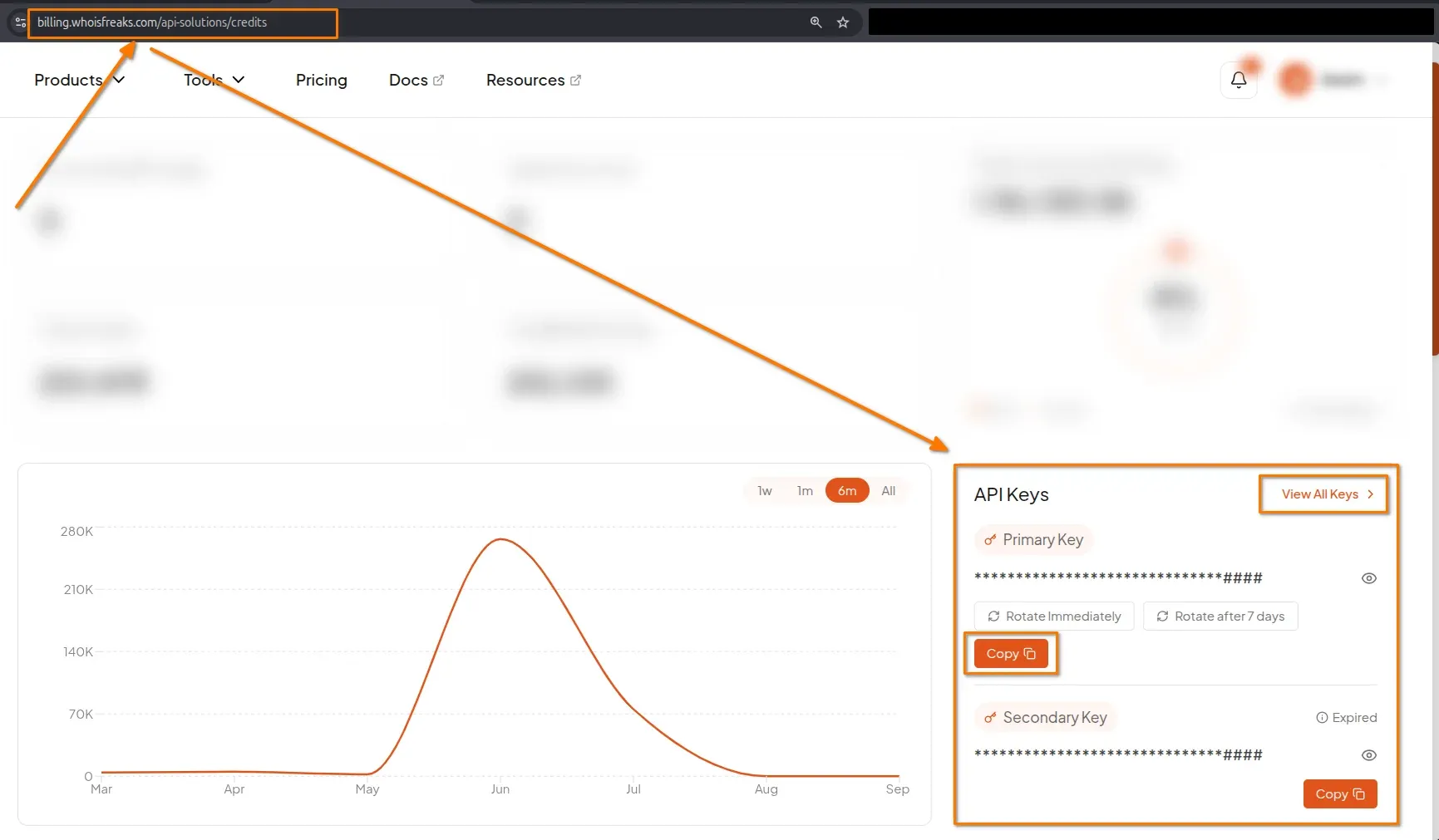
The live DNS endpoint accepts an ipAddress parameter for exactly this.
Pass domainName, ipAddress or both; at least one is required.
curl -L "https://api.whoisfreaks.com/v2.0/dns/live?apiKey=API_KEY&ipAddress=8.8.8.8&type=all&format=json"
The PTR record comes back in the same dnsRecords array a forward lookup uses:
{
  "queryTime": "2026-09-01 05:55:26",
  "ipAddress": "8.8.8.8",
  "dnsTypes": {
    "PTR": 12
  },
  "dnsRecords": [
    {
      "name": "8.8.8.8.in-addr.arpa",
      "type": 12,
      "dnsType": "PTR",
      "ttl": 4611,
      "rawText": "8.8.8.8.in-addr.arpa.\t4611\tIN\tPTR\tdns.google.",
      "rRsetType": 12,
      "singleName": "dns.google."
    }
  ]
}| Field | What to do with it |
| dnsType | "PTR" marks the reverse record. Filter on this, not on array position |
| name | The reversed query name, 8.8.8.8.in-addr.arpa: confirms which IP it belongs to |
| singleName | The answer: the hostname the IP claims, with a trailing dot. Strip it before comparing |
One gotcha: dnsTypes is not a count map. Its values are IANA record type numbers; PTR: 12, A: 1, MX: 15, SOA: 6, TXT: 16. PTR: 12 means PTR is present, not twelve records. Count dnsRecords if you need a number.
A PTR answer is self-asserted: the IP owner writes it, nothing checks it against what actually runs there, and many addresses have none. Use it as a label, not proof of ownership. (dig -x 8.8.8.8 spot-checks a single address by hand.)
Bulk DNS takes an ipAddresses array in the POST body, alongside or instead of domainNames, capped at 100 each.
curl -X POST 'https://api.whoisfreaks.com/v2.0/dns/bulk/live?apiKey=API_KEY&type=all&format=json' -H 'Content-Type: application/json' -d '{"ipAddresses":["1.1.1.1","8.8.8.8"]}'Results arrive under bulk_dns_info, one object per entry with its own boolean status, its ipAddress and the same PTR shape. 1.1.1.1 returns one.one.one.one. One failure does not fail the batch.
That is as far as PTR takes you: one name per address, and only where the block controller bothered to publish one. Everything below works from the index instead.
PTR gives one name. For everything pointing at the address, switch to the reverse index on v2.1:
curl -L "https://api.whoisfreaks.com/v2.1/dns/reverse?apiKey=API_KEY&format=json&value=8.8.8.8&type=a"
| Parameter | Required | Value |
| apiKey | Yes | Your key from the dashboard |
| value | Yes | An IP, a CIDR range, a hostname or a wildcard pattern |
| type | Yes | a, aaaa, ns, mx, cname, txt, soa |
| exact | No | true for exact match, false for wildcard matching |
| page | No | Page number. Defaults to 1 |
| format | No | json or xml. Defaults to json |
The response is a paginated envelope:
{
  "totalRecords": 98252,
  "totalPages": 983,
  "currentPage": 1,
  "reverseDnsRecords": [
    {
      "queryTime": "2024-05-30",
      "domainName": "www.maguire.romamenu.cotest.avalon-invest.pro",
      "dnsTypes": {
        "A": 1
      },
      "dnsRecords": [
        {
          "name": "www.maguire.romamenu.cotest.avalon-invest.pro",
          "type": 1,
          "dnsType": "A",
          "ttl": 300,
          "rawText": "www.maguire.romamenu.cotest.avalon-invest.pro.\t300\tIN\tA\t8.8.8.8",
          "rRsetType": 1,
          "address": "8.8.8.8"
        }
      ]
    },
    {
      "queryTime": "2026-08-30",
      "domainName": "dev.range.red",
      "dnsTypes": {
        "A": 1
      },
      "dnsRecords": [
        {
          "name": "dev.range.red",
          "type": 1,
          "dnsType": "A",
          "ttl": 300,
          "rawText": "dev.range.red.\t\t300\tIN\tA\t8.8.8.8",
          "rRsetType": 1,
          "address": "8.8.8.8"
        }
      ]
    },
    {
      "queryTime": "2026-08-28",
      "domainName": "zhijianluohuashang.kdns.fr",
      "dnsTypes": {
        "A": 1
      },
      "dnsRecords": [
        {
          "name": "zhijianluohuashang.kdns.fr",
          "type": 1,
          "dnsType": "A",
          "ttl": 300,
          "rawText": "zhijianluohuashang.kdns.fr.\t300\tIN\tA\t8.8.8.8",
          "rRsetType": 1,
          "address": "8.8.8.8"
        }
      ]
    },
    {
      "queryTime": "2026-08-27",
      "domainName": "351113136.cn.trustexporter.com",
      "dnsTypes": {
        "A": 1
      },
      "dnsRecords": [
        {
          "name": "351113136.cn.trustexporter.com",
          "type": 1,
          "dnsType": "A",
          "ttl": 777,
          "rawText": "351113136.cn.trustexporter.com.\t777\tIN\tA\t8.8.8.8",
          "rRsetType": 1,
          "address": "8.8.8.8"
        }
      ]
    },
    .
    .
    .
    .
  ]
}
totalRecords is the size of the whole answer, not of this page, and each dnsRecords entry carries the same fields a live lookup returns. The 98,252 figure above is what the WhoisFreaks DNS index held for 8.8.8.8 when this response was captured on 2026-09-01. It moves as records are re-observed, so treat any count you pull as a reading taken on a date.
Two details matter. queryTime is the date the record was observed, not "now", so re-resolve any hit you plan to act on. And domainName is often a subdomain, so collapse hostnames to their registrable domain before counting.
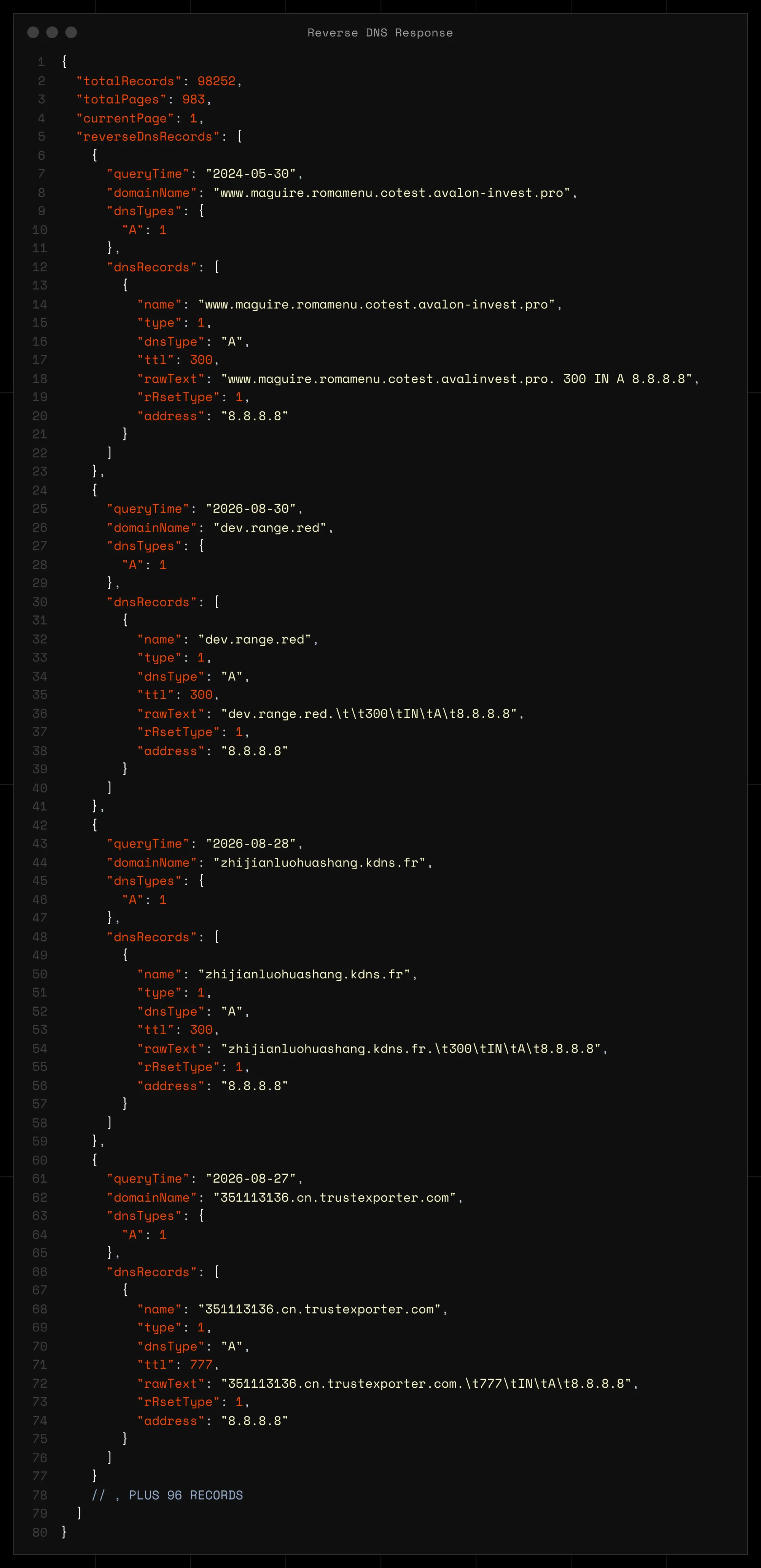
Any record value works, not just an IP, which is what makes this an infrastructure-mapping tool rather than a lookup. Swap value and type together:
curl -L "https://api.whoisfreaks.com/v2.1/dns/reverse?apiKey=API_KEY&format=json&value=ns1.clouddns.com&type=ns"| type | value you supply | What you learn |
| a / aaaa | IP or CIDR range | Everything hosted on that address or block |
| ns | Nameserver hostname | Which domains a DNS provider serves |
| mx | Mail server hostname | Which domains use a mail provider |
| cname | Target hostname | Which domains alias to a service |
| txt | Text record value | Which domains share a verification token |
| soa | SOA host value | Which zones share an origin |
ns and mx are the searches investigators reach for most: a phishing kit spread across fifty domains usually shares one nameserver even when every IP differs.
For types other than A and AAAA, value accepts an asterisk as a wildcard when exact=false:
curl -L "https://api.whoisfreaks.com/v2.1/dns/reverse?apiKey=API_KEY&format=json&value=s*.g*.com&type=soa&exact=false"
Each asterisk matches any run of characters, and you can use more than one; s*.g*.com matches soa1.google.com and srv.gmail.com alike. Pattern matching is documented for MX, NS, CNAME, SPF, TXT and SOA. Send exact explicitly: a wildcard with exact=true searches for a literal asterisk and returns nothing. For A and AAAA breadth, use a CIDR range in value instead.
Read totalPages from page one, then walk the pages with page=2, page=3 and so on; the sample works out to roughly 100 records per page.
Check your limits first. They are enforced per endpoint category rather than as one shared pool, and reverse and historical queries sit in the tightest category because they scan the most data per request. Lightweight live lookups get the highest allowance, bulk sits in the middle.
That matters at this scale. The sample above is 983 pages. At one request per minute that is over sixteen hours, and at ten requests per minute it is under two. Narrow the query with a tighter value, or check what your plan allows on the DNS API before you start the loop. Your exact ceiling for the category is in the rate limit headers on every response.
| Header | Meaning |
| x-ratelimit-allowed-requests | Requests permitted in the window |
| x-ratelimit-remaining-requests | Requests you have left |
| x-ratelimit-remaining-time | Time until the window resets, in nanoseconds |
Sleep when x-ratelimit-remaining-requests hits zero. Exceed the limit and you get a 429: "Please slow down. Your maximum request limit per minute is reached." Usefully, 4xx responses do not consume credits. See the rate limiting and credit usage documentation.
A hit is a lead, not a conclusion. Re-run GET /v2.0/dns/live to confirm the domain still points there, check who owns the address with How to Perform a WHOIS IP Lookup, and see when it moved with How to Check DNS History.
| Step | Action |
| 1 | Copy your API key from the dashboard |
| 2 | /v2.0/dns/live with ipAddress=<ip>; PTR name in singleName |
| 3 | /v2.1/dns/reverse with value= |
| 4 | Swap type to ns, mx, cname, txt or soa to map infrastructure |
| 5 | Add exact=false and an asterisk, or a CIDR range, to widen |
| 6 | Walk page=1..totalPages, watching the rate-limit headers |
| 7 | Re-resolve live, then check IP WHOIS and DNS history |
PTR tells you what an IP says about itself. The reverse index tells you what is actually pointing at it, and for most investigations that is the answer worth having. Full parameters for every type, including the wildcard rules, are in the DNS API documentation.
Send a GET request to https://api.whoisfreaks.com/v2.1/dns/reverse with your apiKey, value set to the IP address, and type=a for IPv4 or type=aaaa for IPv6. The response returns a reverseDnsRecords array in which every entry is a domain or hostname observed resolving to that address, plus the date observed. Expect many results for shared or CDN addresses and few for dedicated ones.
Because the values in dnsTypes are IANA record type numbers, not counts. A is 1, PTR is 12, MX is 15, SOA is 6 and TXT is 16, so an entry reading A: 1 means an A record is present rather than one A record. For an actual count, take the length of the dnsRecords array filtered by dnsType.
Each entry carries a queryTime, which is the date the record was observed rather than the current state. A domain listed against an IP may have moved since. Treat every hit as a lead and re-run a live lookup on /v2.0/dns/live before you act on it.
The index stores every hostname it observes, so www.example.com, dev.example.com and example.com each appear as separate entries. Collapse hostnames to their registrable domain before counting, or one site running many subdomains will inflate your totals. This matters most on shared hosting and CDN addresses.
Run a DNS lookup on any domain with the WhoisFreaks DNS API. Get A, AAAA, NS, MX, TXT, SOA and SPF records in one JSON response, with cURL examples you can copy.
11 min read
Find registered typosquatting domains targeting your brand with the WhoisFreaks Domain Typosquats API - keyword scans, wildcard patterns, paging and triage.
11 min read